




Ever wish you could reset the list of recent documents in InDesign’s File menu? Here’s how.
In the File Handling area of InDesign’s Preferences dialog box (File > Preferences > File Handling), set the Number of Recent Items to Display to zero. Click OK to close the dialog box.
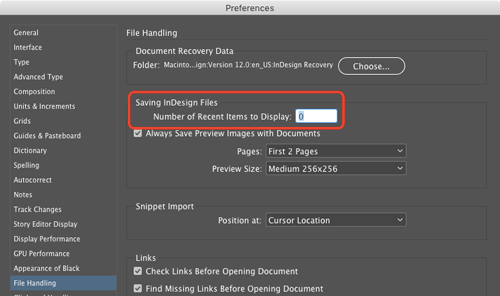
Then, reopen Preferences and change the number of Recent Items to Display to whatever you want. You don’t need to quit and restart InDesign. You’ve now erased the old list of documents and InDesign will keep track of the list of documents you open from that point forward.
This article was last modified on December 16, 2024
This article was first published on June 6, 2017
Commenting is easier and faster when you're logged in!

Recommended for you

Tip of the Week: Controlling the Glyphs Panel Display
This tip was sent to Tip of the Week email subscribers on March 26, 2015. Sign u...
How to Save the Planet with InDesign
InDesign’s dark user interface has created a lot of controversy since its...
Don’t Sweat the Math—Let Photoshop Do It!
Let Photoshop—and other Adobe apps—do the math for you when entering numerical v...