




One of the touted benefits of Adobe’s Creative Cloud was that we’d get smaller batches of new features more often than in the past. Not does this get those features in your hands faster, it also means there’s less you have to learn each time. So why doesn’t it feel any easier to keep up with all the changes? If you’re fighting to keep up with everything new in an already gargantuan app like Photoshop, you need some help. I can think of no one I’d rather have as my guide to the latest and greatest Photoshop features than Deke McClelland. That’s why I love his Lynda.com video series, Photoshop 2015 Creative Cloud Updates. In the series, Deke takes you through all the new features, and drops a ton of cool Photoshop tips along the way.
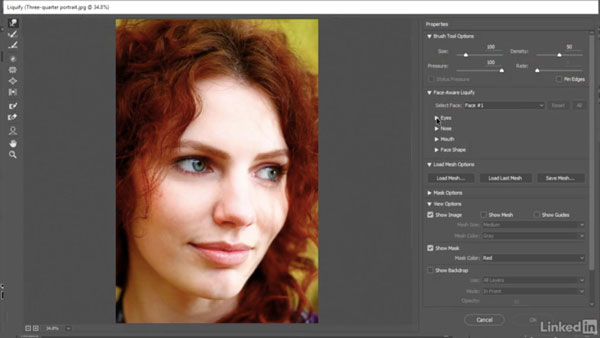
In the free movie below, Deke shows how to use the almost-so-amazing-it’s-creepy facially-aware Liquify features. They’re guaranteed to turn any frown upside down. Literally.
Check it out!
Photoshop Creative Cloud Updates
Special face-recognition scenarios
For Lynda.com members, if you are currently signed in to your account, you can also check out these videos from the series.
Not a Lynda.com member?
Get 10 days of free unlimited access to Lynda.com.
Face-Aware Liquify
Content-Aware Crop
Font families and glyph alternates
This article was last modified on July 27, 2016
This article was first published on July 27, 2016
Commenting is easier and faster when you're logged in!

Recommended for you

50% Off All Photoshop Software from Alien Skin
Alien Skin software, makers of Photoshop plug-ins and iPhone apps for photograph...
CreativePro Video: Adding Hair Effects in Photoshop
In this week’s CreativePro CreativePro video, Steve Caplin uses Photoshop to mak...

A Different Kind of Body Type: Typographic Tattoos
I was on a crosstown bus in Manhattan in 2003 when I spotted a typographic tatto...