




One of the most often repeated tips for setting great looking type in InDesign is to avoid the use of auto leading (which you can easily spot by the presence of parentheses around the leading value).
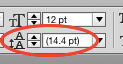
But, there is one case when the use of auto leading is not just a good idea, it’s essential. And that is when you’re working with inline graphics. Nigel French knows a lot about setting beautiful type, and in a free video from his lynda.com series InDesign Typography, he demonstrates the magic of auto leading for graphics, and how to create a paragraph style that creates just the right amount of spacing around inline graphics.

This article was last modified on March 5, 2025
This article was first published on August 14, 2015
Commenting is easier and faster when you're logged in!

Recommended for you

Index Fixes: No Styling in Topic Names
Topic names cannot natively be styled in the Index panel. However, a simple solu...

The Peter Kahrel Script Repository Gets a CreativePro Makeover
Peter Kahrel is one of the most prolific and influential InDesign scripters of a...

A Script to Rotate Objects in InDesign with an Object Style
If you were to ask me how to use an object style to rotate objects in InDesign,...