




Have you noticed that in recent versions of InDesign, the Find Font dialog box isn’t as informative as it used to be? Gone are the little icons that used to tell you at a glance what kind of fonts you had in your document (OpenType, Type 1, TrueType, etc).
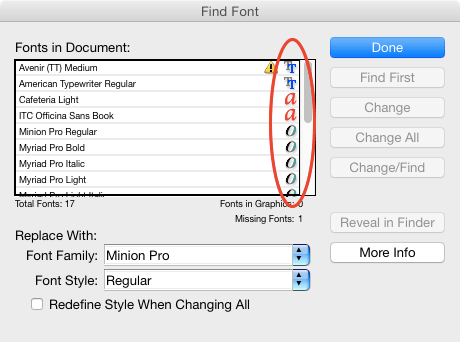
InDesign CS6 Find Font dialog box

InDesign CC 2015 Find Font dialog box
Do you miss this feature? I sure do (though you can still see a font’s type by clicking More Info and clicking on the font). Fortunately for us, Peter Kahrel missed the old dialog box too, because he went and did something about it. He wrote a script called Show Fonts that not only gives you the types of all the fonts in your document in one view, it also shows their status (Fauxed, Installed, Not available, Substituted, or Unknown), and offers the ability to save that font info into a text file.
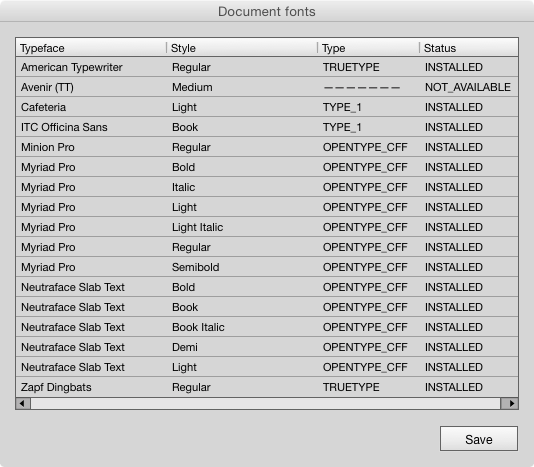
Peter Kahrel’s Find Fonts script dialog box
How cool is that? The script is free to download, but if you enjoy using it, consider making a donation to encourage Peter to keep cranking out goodies like this for us.
This article was last modified on August 2, 2022
This article was first published on July 6, 2015
Commenting is easier and faster when you're logged in!

Recommended for you

Finding, Filtering, and Organizing Fonts in Illustrator
The Illustrator 2026 font browser includes libraries and new options for browsin...

Composite Fonts
Unlock the functionality of the InDesign CJK (Chinese/Japanese/Korean) version t...
New Font Browser Features in Illustrator
Explore the new features added to the Font Browser in Illustrator 2026.