




Kepler is a staggeringly comprehensive typeface by Robert Slimbach, director of Adobe’s type design program. With 168 fonts within the family, in many widths and weights, it’s a beautiful workhorse. I’ve used Kepler Std Regular for the body copy in my Course and Compendium series of software books. In doing so, I discovered a definite kerning bug and what might be another (or could be an intentional setting with which I have a quibble).
By default (when using Metrics kerning), an open parenthesis followed by a lowercase “f ” has an egregious amount of space after it. You might think this a rare combination until you consider these parentheticals:
(for example…)
(for more on this, see…)
(first discussed in Chapter 4…)
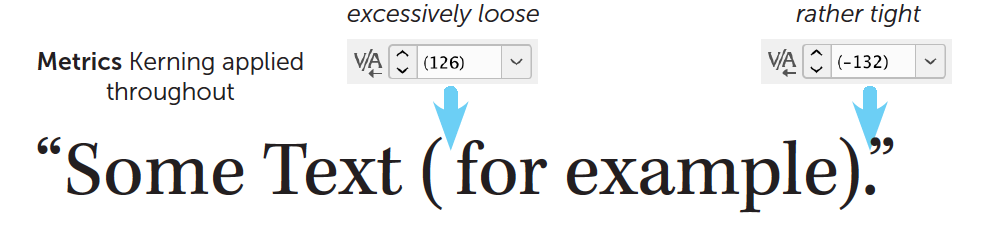
My copy editors have consistently flagged that space for removal thinking, of course, that I must have tapped my spacebar unintentionally. But if you were to insert the text cursor there, you’d see that the kerning is 126 thousandths of an em. I think this must have been accidental. For comparison, Garamond Premier sets this pair to precisely zero.
Reasonable people can disagree with my quibble about the tight kerning (-132) applied to a period followed by a close quote. I’d prefer it to be loosened a wee bit.
A possible solution is to apply Optical kerning in those situations:

For ease, I’d suggest creating a character style for this. However, I find that Optical kerning is a bit too tight at body copy sizes and so is better suited to large sizes where its tightness is more useful. So, instead, I’d want to create two character styles with custom kerning values like below to apply in the these situations.

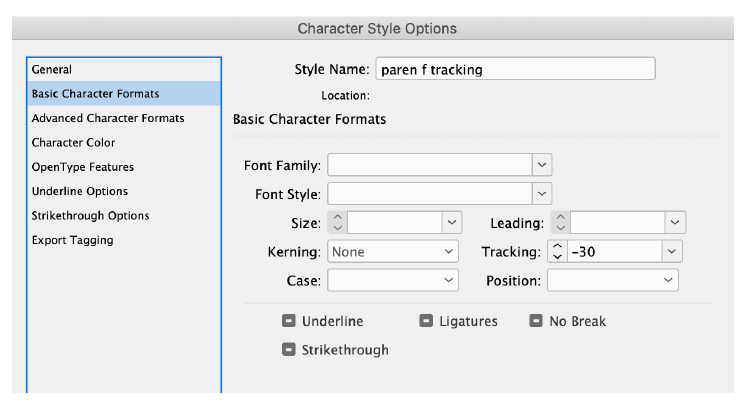
The problem is that we can’t have custom kerning in a character style. Only Optical, Metrics, or None are allowed. But I can use custom Tracking instead if I remember to set the Kerning to None (in case Mr. Slimbach decides to fix/change these kerning pairs).

Here’s the relevant part of one of those character styles:
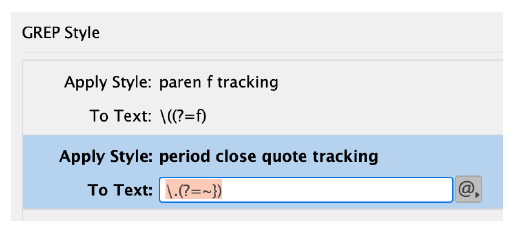
To make it even easier, mindless in fact, I’d use a GREP style in my body copy paragraph style definition. To specify the GREP query for the open parenthesis, we must remember that parentheses have special meaning in GREP, so we have to escape that character with a backslash:
\(
To indicate that we intend to style only those open parentheses followed by a lowercase “f,” we add on a Positive Lookahead, meaning to “look ahead” in the text to see if an “f ” lurks there and, if so, apply our custom tracking character style.
\((?=f)
We can do the same for a period (which also needs to be “escaped”) with a close quote in a separate GREP style to apply its tracking style:
\.(?=~})
The ~} is special notation for the close quote.
The GREP styles in the body copy paragraph style definition will look like this:
Affiliate link disclosure: CreativePro will earn a commission on any purchases made through the Amazon links in this article, at no additional cost to you.
This article was last modified on August 8, 2022
This article was first published on July 23, 2020
Commenting is easier and faster when you're logged in!

Recommended for you

CreativePro Video: Ask the Experts from InDesignSecrets
In this week’s CreativePro video, both David Blatner and Anne-Marie Concepción f...

Convert Custom Letterhead to Microsoft Word Templates
In these modern times of environmental responsibility, plenty of companies are c...
InDesign Basics: Working with Swatches
Swatches make using and modifying colors in InDesign easy and efficient. Learn h...