




This InDesign tip on fast editing of styles via Quick Apply was sent to Tip of the Week email subscribers on August 30, 2018.

Sign up now and every week you’ll get a new tip, keyboard shortcut, and roundups of new articles, plus exclusive deals sent right to your Inbox!
Just scroll down to the bottom of this page, enter your email address, and click Go! We’ll take care of the rest. Now, on with the tip!
Quick Apply is one the most powerful features in all of InDesign: Just press Command/Ctrl-Enter to open the Quick Apply window, type a few characters of a style name (character style, paragraph style, or object style), and press Enter to apply it.
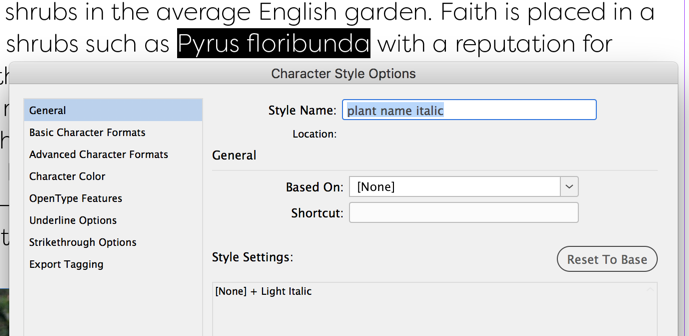
But did you know that if you press Command/Ctrl-Enter after choosing the style name (instead of Enter), InDesign opens the edit dialog box for that style? Much faster than navigating through the panels, especially when you have a lot of styles.

This article was last modified on July 7, 2021
This article was first published on September 4, 2018
Commenting is easier and faster when you're logged in!

Recommended for you

10 Terrific Time Savers for InDesign
Life is busy. Work is hard. Use these tips to get more done faster.
Tips to Control Photoshop Layers
Khara Plicanic shares smart Photoshop Layers panel tips to help you find and man...
Make Headings Span Across Multiple Columns in InDesign
Master InDesign’s Span Columns feature with Pariah Burke.