


Draw On It: Corel’s Latest Graphics Suite Packs Powerful Punch


Make It Move
It isn’t Macromedia Flash or Adobe LiveMotion, but Corel Rave is a pleasant little Web graphics animation tool. The program is great for the beginning to intermediate-level user who wants to generate simple Flash, AVI, GIF, and QuickTime movies and but doesn’t need advanced features such as movie animation, sophisticated object behaviors, and Action Scripting.
Rave is easier to learn (and far less expensive) than Flash or Live Motion and can produce surprisingly sophisticated output. The interface is basically identical to CorelDraw (and now supports Symbol libraries as well), with the addition of a TimeLine docker used to set the lifetime of each object in the document. Basically, Rave’s primary talent is its ability to turn a blend into an animation. For example, if the object 1 is in the upper left corner of the display and object 2 is in the lower right corner, you just create a blend between them and use the Create Sequence from Blend tool to produce a smooth animation. You aren’t restricted to positional parameters, of course, so it’s just as easy to animate transparency, color, drop shadow, and so on.
Movie control is handled by the Timeline docker. Moving the Lifespan marker adjusts the time an object is visible on the display. Each frame in the Timeline can be independently edited. Animations can also be created in the Timeline by inserting keyframes (basically a snapshot of an object at a specific time) — Rave will automatically tween (generate intermediate animation steps) between two keyframes. In version 2, the Timeline docker has buttons for inserting or deleting frames, thus providing a little more control over the movie sequence.
Version 2 supports tweening on a path — that is, create a blend, create an animation from the blend, specify a motion path, and let Rave generate as many intermediate steps as you wish. Also new in this version is the ability to animate Perfect Shapes (Corel’s built-in symbols) and vector extrusions, and preview Flash movies in your browser (see figure 7).
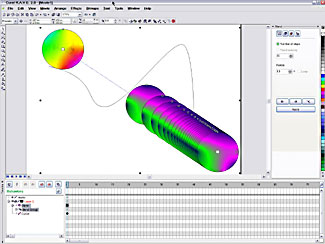 Figure 7: Making an object follow a path is simple to do in Rave. Here we created a blend, made a movie out of it, and bound the movie to the path.
Bear in mind that the major advantage of the Flash format is that it is vector-based, making for compact SWF files that download and execute quickly. And many of Rave’s cool animation effects — for example, transparency — can only be generated as bitmaps, resulting in file bloat and jerky animation with slow Internet connections. Rave’s limitations become more obvious when you compare the program to, say Live Motion, where transformation properties (size, color, position) are independent of each other and may thus be tweaked separately in the timeline. More importantly, Rave’s animations don’t support much interactivity — cool Flash games and interactive Web sites are just not possible with this program. Version 2 does add a few more interactive behaviors — -Play, Stop, Go To, and Load/Unload Movie, for example — but these don’t begin to touch the advanced behaviors and object actions available in Flash and LiveMotion.
And the Rest of the Story
In addition to the three major apps, Corel Graphics Suite ships with a impressive grab bag of utilities. Our favorite is the Bitstream Font Navigator — basically the only real font organizer for the PC platform. With this utility, you can install and remove fonts, copy them to another location, explore the character set, and assemble font groups for specific projects. The program hasn’t changed much in this iteration and it still doesn’t understand OpenType — a failing that we hope will be addressed in the next version. The Mac edition includes Corel’s version of Diamondsoft’s FontReserve — we don’t have a Mac so we can’t say much about it.
CorelTrace is an excellent raster-to-vector program that does a surprisingly good job tracing both monochrome and color images. You can adjust the sensitivity and type of trace, for example, centerline or outline, and set the number of iterations to produce a more detailed result. CorelTrace is remarkably speedy too. Also included in the box are a screen capture program (CorelCapture), a duplexing wizard, a barcode wizard, and an OCR program (ScanSoft’s OmniPage SE), which did a pretty good job of converting our test scan into text (although as of posting time it appeared as if the program didn’t make the final product release). And, of course, Corel throws in hundreds of fonts in both TrueType and Type 1 format and thousands of pieces of clip art, photos, and Web animations.
Unlike version 10, which shipped with a couple of useless pamphlets in place of documentation, version 11 is supposed to ship with a full complement of high-quality manuals that users have come to expect from Corel. For those who don’t want to dip into the docs, the excellent on-line tutorials will quickly get you up to speed.
CorelDraw continues to be the most cost-effective way to set up a graphics shop with everything you need for image editing, illustration, and Web animation. However, neither Photo-Paint or Rave are substitutes for Photoshop or Fireworks or LiveMotion respectively. If sophisticated Web graphics and animation is your primary focus, we recommend you go for the premium products instead of this suite.
This article was last modified on January 18, 2023
This article was first published on August 13, 2002
Commenting is easier and faster when you're logged in!

Recommended for you

Fill Live Text With Any Image in InDesign
Mike Rankin shares the trick for filling live text with any color, pattern, or p...

Surreal Photoshop Effects: Swimming on Land
People swim in swimming pools. Or in the sea. But why limit ourselves to the obv...
Scanning Around With Gene: When Chemicals Plus Electricity Equaled Beautiful Art
You could certainly argue that the graphic arts industry, even in its present co...