




“Before & After” Magazine”

You can subscribe to “Before & After Magazine” in PDF or Print.
Click here to learn more.
Electronic organizers are a great way to manage your calendars when what interests you is data. But to tell a story, present a product or stir a memory, you’ll want a good, old-fashioned paper calendar. Here’s how to design a small calendar.
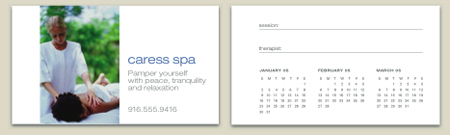
The PDF we have posted shows you how to design and print a business-card size and postcard size calendar. Just click the link “How To Design a Small Calendar” to open the PDF file in your Web browser. You can also download the PDF to your machine for later viewing. This how-to is formatted for easy onscreen reading. However, if you prefer paper, see pages 20 through 28 of the PDF, which repeat the information in a format suitable for printing.
To open the PDF, you’ll need Adobe Acrobat or Adobe Reader. We highly recommend Acrobat Reader 7.0 to view Before & After PDFs. You can download the Acrobat Reader here.
To learn how to configure your browser for viewing PDF files, see the Adobe Reader tech support page.
This article was last modified on January 6, 2023
This article was first published on October 3, 2005
Commenting is easier and faster when you're logged in!

Recommended for you

Editor’s Picks for The InDesign Conference 2025
Our Editor in Chief lists his must-see sessions for the InDesign Conference 2025...

Interview with Deborah Corn, Intergalactic Ambassador to the Printerverse
Q&A with Deborah Corn, who is presenting at The Design + Marketing Summit 2025
Building a Brand System with Purpose and Personality
Build a more intentional brand system by aligning purpose, audience, and color w...