



A Stitch in Time
All of these software solutions are much quicker and simpler than using Photoshop to manually combine the files. As with any project in the field of digital imaging, the major issue to consider before you adapt a solution is to evaluate what the final use of the image will be. If you have the high-tech equipment necessary to create micro-controlled panoramic shots, if you are creating Virtual Reality images, or even if you just intend to go through this more rudimentary process regularly, then Stitcher is likely your best solution.
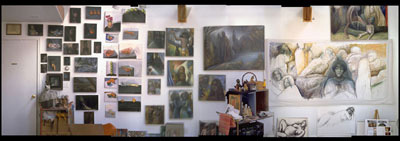
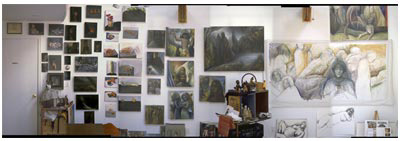
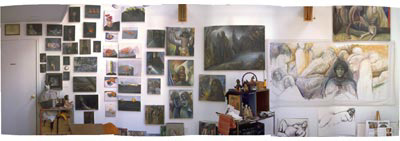
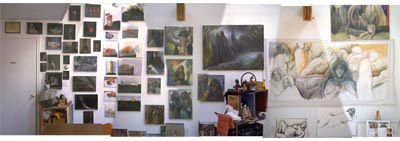
If instead you are creating images for Web viewing (that will be reduced in size and resolution), or for personal use (so that great sunset can be in your album), there is little reason for you to look beyond one of these less expensive software-stitching solutions. If you stitch in high resolution and then reduce the size of the image, you aren’t likely to see most of artifacts (see Figure 10).
10a
10b
10c
10d
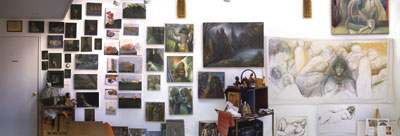
Figure 10: The 50mm focal-length studio shots: Stitcher (10a), Olympus (10b), Canon (10c), Photoshop Elements (10d).
If you want a tourist camera with good support for panoramas, the Canon PowerShot camera series, with its onscreen Preview that helps with alignment, is a great choice, and the only all-in-one solution. If you have an Olympus camera and plan to stitch together shots, then do upgrade to the CamediaPro software. If you have another brand of camera and want some panoramic stitching support, then the inexpensive Photoshop Elements creates more unusable artifacts than the other options, and is a much more robust product than the Canon or Olympus software.
For the remainder of 2003, there are some huge promotions and rebates that bring the price of Photoshop Elements in line with the utility software offered by Canon and Olympus. The worst results of all came from stitching the Olympus images with the Canon software, and the Canon images with the Olympus software — so if you own one camera, don’t consider purchasing the other’s software. If you have an Olympus or Canon product and software and Photoshop, then there’s also little need for you to get Photoshop Elements. But if you have another brand of camera and want some help with stitching, or you don’t have Photoshop and want an entry level version at a bargain basement price, then you can’t beat getting Photoshop Elements — at such a low price it’s a great deal.
If you have another brand of camera and you already have Photoshop (sorry, but Photoshop, the big version, doesn’t have Photomerge, at least not yet), you have the hardest decision. If you just want a little bit of stitching help, you should probably look at the Canon utility software (easier stitching), or Photoshop Elements (a little less automatic, but adds few extra features). If you think you want more help than this, consider how much stitching you want to do, and for what purpose. If you’re intending to shoot frequent vacation shots, you should probably even consider purchasing one of the Canon PowerShot cameras, which start in the $200 range, and include the stitching utility. If you want to create higher-end panoramic images, consider purchasing Stitcher. And then of course, if you become truly addicted, you may need to purchase the professional gear suggested by Brain Lawler and Sean Wagstaff to help you take your pictures in optimal alignment.
As of yet, none of the software solutions generate layered files. That means if you’re displeased with any elements within a flat, rendered, final file, retouching is a bit more difficult than in the manual way where layers are maintained, although RealViz’s Stitcher does provide those two Mixing methods, which should aid in your retouching process. If you are creating high-resolution images for print, none of these software solutions will likely replace your having to manually stitch layers in Photoshop, but you can probably save a good chunk of time beginning with a software-stitched version, and then manually combining this stitched version with the originals source photos in Photoshop.
For a closer look at the comparisons, download the Photoshop files in which each stitching method is shown on its own layer.
- To download the Studio Wall panorama, Right-click or Control-click here.
- To download detailed images of the Studio Wall, Right-click or Control-click here.
- To download detailed images of the House shot, Right-click or Control-click here.
- To download the Cityscape panorama, Right-click or Control-click here.
Unstuff the .sit files, then open in them in Photoshop. Open the Layers palette, then view each layer one by one (hiding the other layers as you go along). You can see how well each application did in close-up. (Note: These are large files that will download under the name “jump” 1,2, etc. Uncompressing them will yield the complete file names.)
All Sewn Up
Finally, I wanted to give you some quick notes on the cameras. After trying them all out, I’m buying one of each. The Olympus C-730 is an amazing camera, with new improved models coming in the May/June timeframe. With a 10X optical zoom (38-380mm!), I was able to take pictures I hadn’t thought possible. The Olympus C-730 is lightweight and discreet, a bit smaller than a standard SLR. Because the digital camera gave me instant feedback, I was able to make adjustments and keep shooting to get what I wanted instead of shooting rolls of experiments that didn’t work (see Figure 11). Opening the aperture, speeding up the shutter, manually white balancing — all are quite simple and give you immediate results. I haven’t been so excited about any technology in a long, long time — I love this camera, and can’t wait to get the C-750 when it ships!

Figure 11: After accidentally discovering that I could capture the movement of jazz musician Kid Merv (at the Café Negril in New Orleans), I was able to adjust manual settings to control how the movement was recorded to the camera — and shoot away! If I had waited for the film to come back, I would have missed this opportunity completely. To see more photos from this series, go to www.ssteuer.com/digitalphotos.
The Canon PowerShot camera is perfect for my husband. He’s able to keep it in his pocket when he takes to the road with his remote audio recording. He’s also a professional vacationer and always planning the next trip. We stopped lugging our SLRs years ago and instead got a good compact 35mm. Now I’ll bring my Olympus, but even that camera is too big to always take along, so with the mini Powershot we’re likely to reduce those times in every trip when we lament not having a camera. If you’ve been looking for a camera that’s small enough so you always have it with you, this is it!
Read more by Sharon Steuer.
This article was last modified on January 3, 2023
This article was first published on April 29, 2003
Commenting is easier and faster when you're logged in!

Recommended for you

Simultaneous Contrast: How Your Environment Affects Color Perception
This article originally appeared on chromaqueen.com. Republished with permission...

Panasonic Introduces Three New FX Series LUMIX Digital Still Cameras
Panasonic today introduced the new LUMIX 7.2-megapixel DMC-FX50 and DMC-FX07 dig...

Tips for Shooting and Editing in Camera Raw
Why Shoot in Raw Format? Whether you realize it or not, if you are using a DSLR...