




Users of Creative Cloud assets in North America have been surprised to find out this week that unannounced interface changes have (at least temporarily) removed some features which were being actively used by Creative Cloud customers.
The Versioning History and the Search field are missing. The Versioning History was found in the Activity panel (Figure 1) and let you keep up to 10 days’ worth of versions of Creative Cloud files. This wasn’t much, but it could save your tail if you deleted something by accident.

Figure 1: Previously you could save up to 10 days of revisions to Creative Cloud files in the Activities panel but this is now discontinued.
Other categories like Libraries and Mobile Creations have not been moved to new interface. For example, when you click on Libraries you’ll see a message, “Libraries aren’t here yet but we’re moving them soon.” When you click on a button, you’re taken back to a different URL where they are displayed in the old interface.
Anne-Marie discovered the changes in the Creative Cloud assets interface and posted about it on Twitter Thursday, April 19, when she noticed posts on the Creative Cloud user forums asking if the versioning features were gone. The changes apparently happened this week.
There was no prior notification of the changes and the announcement was extremely low-key, only a tweet on Wednesday from @creativecloud that led to a blog which described the changes. Considering the fact that some people may depend on the versioning feature, this is pretty shocking!
The New Creative Cloud Assets Interface
You can get to the Creative Cloud assets webpage by choosing assets.adobe.com, or by clicking on the Creative Cloud Files link on your Adobe.com entry page when you’re logged in with your Adobe ID.
The first time you enter the new interface, you’ll be greeted with the message in Figure 2.

Figure 2: When you enter the new Creative Cloud assets interface, you’ll be greeted with this message.
The interface is cleaner and better organized (see Figure 3). One commentator said that it now looks more like Dropbox.
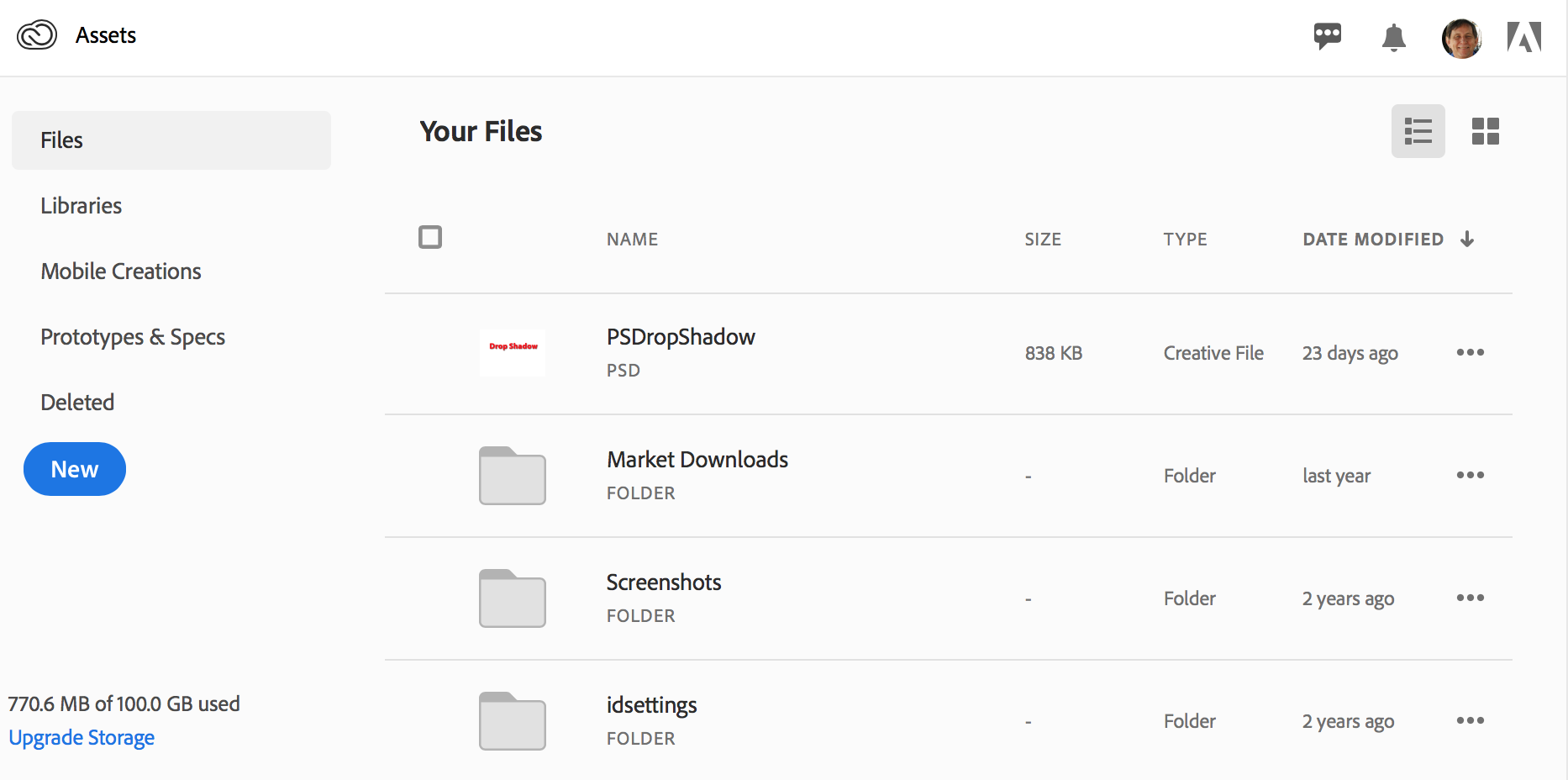
Figure 3: The new interface is cleaner and more “Dropbox-like.”
Here are some of the other changes. Missing and moved features are promised to return in time:
- With the Activity section missing, its components are moved to different locations: Sharing notifications are shown in a bell icon at the top of the page. Help is found under your Profile icon. You can manage your quota on the bottom left.
- The Archived section under Files has been moved to a new Deleted section.
- Search and version history are missing but are supposed to return in the middle of 2018.
- The Recent section is also missing and is supposed to be back in the “next few months”
- The Libraries and Mobile Creations sections are supposed to be integrated “later in 2018”
One other piece of good news: Creative Cloud and Libraries now have a UserVoice website where bugs and feature requests can be made: https://creativecloudassets.uservoice.com
This article was last modified on July 25, 2019
This article was first published on April 20, 2018
Commenting is easier and faster when you're logged in!

Recommended for you

The Unexpected Rebirth of Adobe DNG
The Adobe Digital Negative (DNG) format started out as an open file format for s...

Help Adobe Drive the Future of InDesign + Print
I recently used Adobe’s plug-in for Photoshop called Design to Print, and...