




You probably know that you can make several different kinds of hyperlinks in InDesign, including links to URLs, pages, other documents, and even links that will create new email messages.
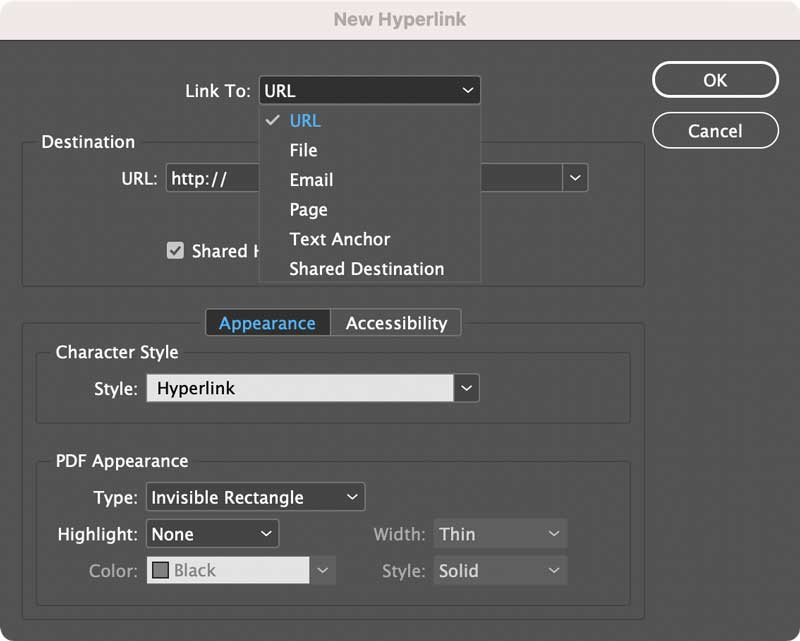
But what’s not obvious from the choices in the dialog box is that you can also make hyperlinks that will make phone calls. So, for example, you can make the phone number in your contact info clickable/tappable so folks don’t have to dial it.
Here’s how.
Select the object or text you want to apply the phone hyperlink to, and click the New button on the Hyperlinks panel.
Choose Link To: URL
In the Destination URL field type tel: followed by the phone number.
For example, to call the White House, you’d set the destination to: tel:12024561111 or to call the U.S. Naval Observatory to get the current time you’d enter tel:12027621401 or to reach the CreativePro voice message line you’d enter tel:13122521292

Then just export to PDF or Publish Online. When someone clicks or taps on the hyperlink, their computer or mobile device will try to dial the number in the default application for voice calls. On a mobile phone it should use the Phone app.

On a desktop computer it could launch programs like FaceTime or Skype. On the Mac, you can choose which app will launch by going to FaceTime Preferences and picking from the Default For Calls menu.

This article was last modified on May 11, 2021
This article was first published on May 11, 2021
Commenting is easier and faster when you're logged in!

Recommended for you

What’s That Alert or Question Mark Icon in InDesign?
Sometimes InDesign's alert icons are mysterious to the unintiated. Here's an exp...

Creating Library Assets With Adobe Capture CC
Editor’s note: Don’t miss Steve’s extensive story on CC Librar...
A Fix For InDesign’s Email Hyperlink Problem
It’s simple to create an email hyperlink with InDesign, but did you ever n...