




[Editor’s Note: You can download the 2011 version of the Shutter Sisters’ calendar templates at https://shuttersisters.com/home/2010/10/23/2011-photo-calendar-templates.html.]
Whether you’re a photographer or artist, or you
just know how to search for images on Google and Flickr, this free 2010 mini calendar template is ideal for making customized gifts for friends, family, and clients.
Step 1
Download the template (courtesy of the Shutter Sisters photo blog) here: https://shuttersisters.com/home/2009/10/24/2010-photo-calendar-templates.html.
Unzip the file and you’ll see a folder with twelve Photoshop files (one for each month) and an instruction page.

Step 2
Choose 13 images that will work in a horizontal format. The cover image is 4.627″ wide by 4″ high, and the monthly images are 4.627″ wide by 3.05″ high. If you don’t use your own photos or illustrations, you can find images on Google or Flickr that are in the public domain or licensed for personal and/or commercial use. To be sure you’re not violating copyright, read “Safely Find and Use Images Via Google” and check the relevant boxes on Flickr’s Advanced Search page.
Step 3
Place your images in the Photoshop files, cropping them to fit if necessary. When ready to print, choose File > Print, change the Color Management dropdown menu to Output, and check Corner Crop Marks. In older versions of Photoshop, go to File > Print with Preview, check the Show More Options box, choose Output from the dropdown menu, and check the Corner Crop Marks box.

Print onto pale-colored paper that’s substantial enough to not wilt when standing upright in a stand.
Step 4
Using the corner cropmarks, trim the pages to the right size and place them in a CD jewel box, which you can buy at an office-supply store. Wrap the jewel case with something festive, and you’re done!
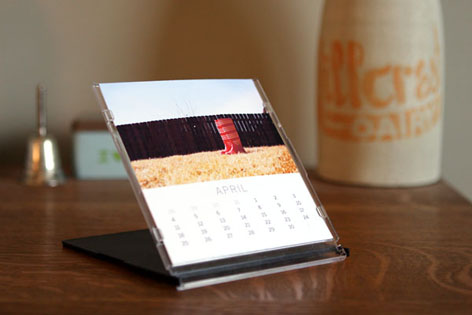
image courtesy the Shutter Sisters
This article was last modified on January 5, 2023
This article was first published on December 3, 2009
Commenting is easier and faster when you're logged in!

Recommended for you

Creative Folding for Every Budget
Whether you’re a high roller or watching every penny, you can find an eye-catchi...
How to Choose Colors for Design and Marketing Success
Learn how to choose color thoughtfully for your designs and marketing campaigns,...

The Sign Painters
It’s easy to take for granted that the existence of digital tools for creating g...