




Today I had to work on a font problem with some moldy, oldie InDesign CS files. I was given a folder of files and didn’t know which ones contained the problematic font. I didn’t even have all the fonts I needed yet, but I just wanted to get started sorting out the files. I remembered Fritz’s post mentioning Bridge’s ability to show the fonts used in a InDesign document. Brilliant. Show the Metadata panel, do a little search…
Sadly, it was a Bridge to Nowhere. Bridge only listed the fonts in the document that I currently had installed on my machine, ignoring the ones that were used in the documents but missing.
Here’s what Bridge says the document uses:

Note: It lists Times, since that is the font used by [No Paragraph Style].
Here’s what the document really needs.
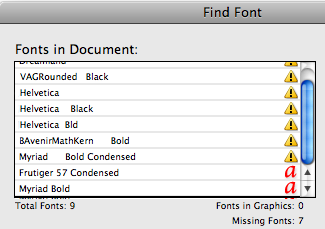
Looks like Bridge may have a little blind spot. Or there could be something particularly goofy about this set of files. I’m sure they’ve passed through many hands over the years. Like mom says, “don’t touch those files, you don’t know where they’ve been!” Anyway, I don’t have InDesign CS installed anywhere to test this phenomenon with a fresh set of files. So the jury’s still out.
The good news is, the problem did not occur in CS2-4 files I tested. Missing fonts in those versions showed up and Bridge and could be used as a criteria to find files. But what continues to bug me (pun intended) is that updating the CS files to CS2, 3, or 4 does not help the problem. Nor does exporting to INX or IDML and creating fresh files. I just can’t get Bridge to see missing fonts in files originating from InDesign CS.
But on the bright side, I did learn that Bridge can see the fonts listed in INX and IDML files, which is pretty cool.

This article was last modified on December 19, 2021
This article was first published on June 18, 2009
Commenting is easier and faster when you're logged in!

Recommended for you
CreativePro Font Collection Vol. 1
A curated collection of over 180 professional-quality fonts in 13 families clear...

Albert Einstein Font on Kickstarter
Kickstarter, like other successful crowdsourcing sites, is a weird and wonderful...

20 Obscure Features
David Blatner shares his favorite 20 obscure features that every InDesign users...