




This script is part of the Book Panel collection. See the full collection here.
This script is part of the Book and Long Document Composition/Production collection. See the full collection here.
InDesign’s Book panel lacks various useful features. The script described here adds some of them. It would be possible to do that by adding items to the Book panel for a nicely integrated solution (see, e.g., Jongware‘s script and an updated version), but I prefer to take the simpler route of a separate script. This makes it easier to add functionality and is easier to manage generally.
With a single book open, run the script and it will show this window:
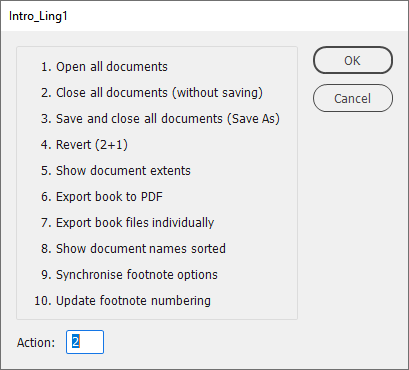
The script is essentially a launchpad for separate scripts. These should be installed separately. The first four functions (opening and closing documents) are built into the script because they are fairly short and straightforward. The remaining functions are accessible only if the corresponding scripts are present; if they’re not, they are greyed out in the script dialog box.
In what follows I’ll describe each function and give a download link if it’s a separate script.
Open all documents
Open all the book documents. The way InDesign works is this: you select all documents, then you double-click the list. But that’s a bit of a hit-or-miss affair. Moreover, InDesign may stop at every document if there are errors (missing links, missing fonts, dictionary problems, etc.) and ask for confirmation. The script suppresses all warnings and opens all documents. (Note that it’s not possible to open selected documents: it’s all or nothing.)
Close all documents (without saving)
This silently closes all the open book documents without saving them. nly documents that are in the book are closed.
Save and close all documents (Save As)
All documents are saved and closed. The script uses the Save As method (to remove the document’s undo stack).
Revert
All documents are closed (without saving them) and reopened.
Book Page Extents
Show the extent of each document and the book’s extent:
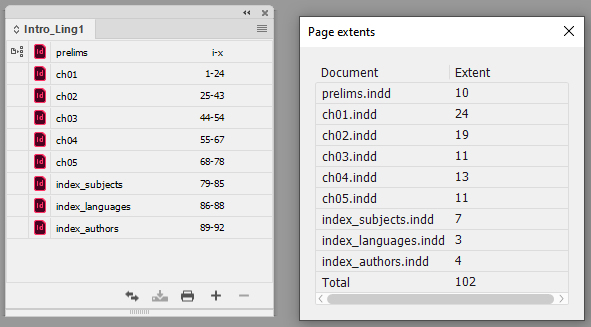
See here for details.
Export book to PDF
InDesign documents and books don’t remember where they were last exported to, which name was used for the export and which preset was applied. The script fixes that. See here for details.
Export book files individually
“Export book to PDF” in the book panel’s flyout always creates a single PDF file. The script exports all documents in a book to separate PDFs. You can opt to export documents whole, page by page, or section by section. See here for details.
Show document names sorted
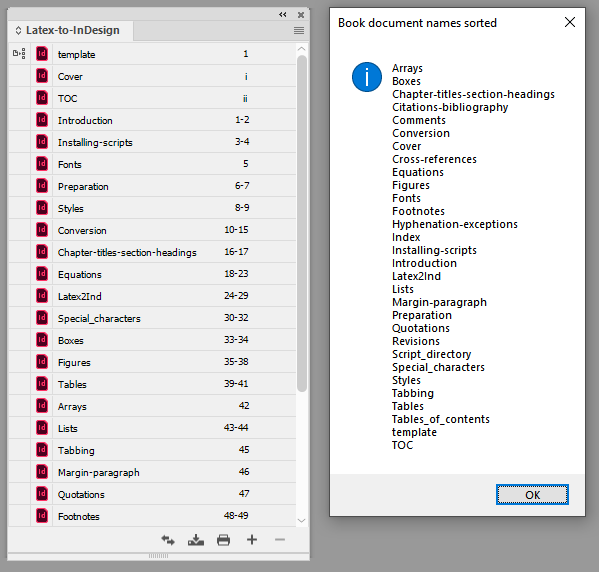
If a book contains many documents and their order in the Book panel is not alphabetical then it’s useful to show them sorted from time to time. The order in the book remains the same, the script just shows the document names sorted in a separate panel. See here for details.
Synchronise footnote options
The Book panel’s Synchronise options do not include the footnote options. These options can be synchronised with the script. See here for details.
Update footnote numbering
The Book panel’s Update Numbering function includes section, chapter, page, and paragraph numbering, but not footnote numbering:

This means among other things that you can’t continue footnote numbering across a book, you’ll have to set each document’s footnote start number manually. The script fixes that. See here for details.
Version history
7 Jan. 2026: Fixed a bug (the sorter didn’t work) and the script now opens its window where you closed it.
28 Dec. 2025: Added some functions.
July 2023: First posted.
Peter Kahrel Script Repository
Hosted as a community service, and with deep appreciation, by CreativePro.com
Scripts by Topic | Script Index
Basic Script Installation and Use
How to Modify or Configure These Scripts
Resources for Scripting and Publishing Automation
About This Repository
Contact Peter Kahrel
Note to users: You run scripts at your own risk: CreativePro and the author accept no liability for anything that may be caused by any of these scripts. Always take the necessary precautions. We encourage you to save backups and test scripts on copies of your documents.
Peter Kahrel Script Repository
Hosted as a community service, and with deep appreciation, by CreativePro.com
Scripts by Topic | Script Index
Basic Script Installation and Use
How to Modify or Configure These Scripts
Resources for Scripting and Publishing Automation
About This Repository
Contact Peter Kahrel
Note to users: You run scripts at your own risk: CreativePro and the author accept no liability for anything that may be caused by any of these scripts. Always take the necessary precautions. We encourage you to save backups and test scripts on copies of your documents.
This article was last modified on September 30, 2026
This article was first published on January 7, 2026
Commenting is easier and faster when you're logged in!

Recommended for you
Adobe Certified Professional Exam Prep Guides
Use these self-assessment guides to determine what you should study to pass the...

Interview with Joy Pollard, Designer and Adobe Certified Professional
Learn how roller derby, astronomy, and theater influenced one designer’s journey...

Quick Wins: Handling Images in InDesign
Use these five resources to boost your image-handling skills in InDesign