



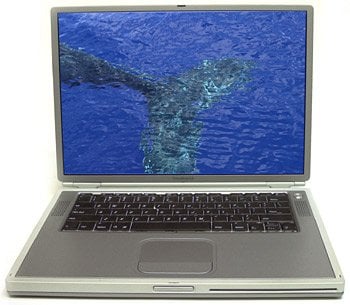
Look, Feel
The ergonomics of this silvery PowerBook are very good. The mouse-clicker is different than my PowerBook G3, and it took me a few minutes to feel comfortable with it. I am sure that in a few days this would feel as “natural” as my previous (can it be?) five PowerBooks.
The keyboard has the best feel of all the recent Macs, with a moderate touch that lets you know you have struck a key. It’s clearly a typist’s keyboard, and I really enjoyed typing on it. I recently used a desktop PC in an airport lounge, and was amazed at how bad the keyboard felt — too mechanical, and depressing a key required way too much. By contrast, the new PowerBook is a dream to type on, and I did a good deal of typing on this trip.
The LCD screen is free of the color and brightness shift you get off-axis with many older LCD panels on both Mac and PC laptops. Evidently Apple has used some of its acquired knowledge from the Cinema Display to enhance this one. In a word: gorgeous. Watching a DVD on the G4 monitor is like having a personal movie theater on an airplane or in your hotel room.
On the plane I was sitting near a person typing on a Sony Vaio. The Vaio is much smaller and slightly lighter, but the screen on the PowerBook makes carrying the larger body worth the trouble. This is a creative person’s portable computer, and it shows in the display quality and size.
What impressed me in my initial hours with the Titanium was how slim and elegant it is. With speed and power to boot, it’s a fine machine. And, as the day wore on, the Titanium kept going and going, its battery continuing long into the night. In fact, the battery lasted long enough to get me to Maui, a five-hour flight, with some reserve juice to spare once I arrived. It seems that Apple, among others, has finally delivered the battery technology and power-efficient hardware that a long-distance traveler really needs.
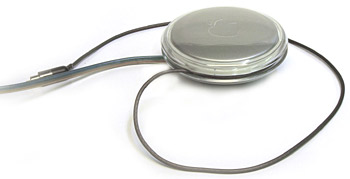
The sleek AC adapter helps keep the Titanium stylish even when it’s in need of a charge.
Show and Tell
Of course, you can’t go to Maui and not take at least a few photos, so reluctantly I left my hotel room to roam the beaches — purely for research, mind you. I shoot with a digital camera, using Compact Flash cards to hold my photos. In the side of the PowerBook G4 is a single PC Card slot for accessory cards. Using an adapter, I inserted a Compact Flash card from my camera, and the images showed up immediately. I used Photoshop 6.0 to open them, and the view on the Titanium was excellent.
Later I had a chance to plug my Sony digital video camera into the Titanium’s FireWire socket. Using iMovie 2, which ships with the PowerBook G4, I was editing a movie in minutes (and I never even tried the tutorial). This also helps the Titanium live up to the claims in the ads. The movie studio on your PowerBook is not just advertising jargon — it really works.
Cast Away
After a week on Maui with the titanium PowerBook G4, I found it very comfortable and speedy. I used it for most of the types of projects I usually do on my desktop G4 computer, and I found it to be a very pleasant machine with more-than-adequate features. When I returned to the mainland the following week, I had to transfer the materials I had created on it to my other PowerBook and return the machine to Apple. I carried it up the steps at the FedEx office, and sadly dropped it off for shipment.
I had tasted a delicious new fruit and was greedy for more. After returning it to Apple I checked the Apple Store to see how much a nice new titanium PowerBook costs, and I was pleasantly surprised to see that they are cheaper than the PowerBooks I have bought in years past. The base model, with a 400MHz processor, 10GB drive, and 128MB of RAM is $2,599. The 500MHz model with the 20 GB drive that I tested is $3,499. A high-end model with a 30GB drive and an extra power supply and battery is priced at $3,997.
When I bought my G3 PowerBook it cost more than $3,499 including extra RAM, the optional DVD drive, the CDROM drive, a ZIP drive and an extra battery. The price of the Titanium is looking pretty attractive.
And sure enough, using the Titanium in my presentations had the desired effect. After I finished speaking, several people wanted to look at it, and more than a few wanted to pick it up to feel its weight. They were impressed — as was I — with how much technology can be squeezed into a slim portable computer.
Patience in Action
Every time I purchase an Apple PowerBook it seems like it’s the computer of my dreams, and happily my PowerBooks have never let me down. They have been reliable, hard-working machines that take a beating as I travel the world making presentations and doing routine work. The scratches on the case of my G3 will attest to the tough treatment this machine has received, and it still runs great.
Will I get a Titanium machine? Probably. My PowerBook G3 doesn’t have FireWire, and it would be nice to be able to capture digital video and run FinalCut Pro, though boondoggles to Maui notwithstanding, I haven’t felt the need to cut a movie while on the road. Until I find the indispensable thing the Titanium will do that my current PowerBook absolutely can’t, the Titanium will just have to wait — at least for a few weeks.
This article was last modified on December 13, 2022
This article was first published on March 15, 2001
Commenting is easier and faster when you're logged in!

Recommended for you

InDesign Template: Company Data Sheet
This InDesign template is for a company data sheet. Use it to attractively prese...

Adding Files to a Book
If you use InDesign’s Book feature to work with long documents, you probab...

InDesign Magazine Issue 86: Photography and Design
InDesign Magazine issue 86 with articles about self-published books by photograp...