




As I’ve written in previous articles, Microsoft Word can continue to play a role in an organization’s workflow even after Adobe InCopy has been implemented. It’s also not uncommon for users who had previously used Word heavily to have to transition to using InCopy to facilitate the benefits that InCopy has to offer. Either way, users often want to use InCopy in a similar way that they used Microsoft Word. That’s actually one of the selling points of InCopy and one of the reason why InCopy is visually laid out the way that it is, to somewhat mimic the layout seen in Microsoft Word. The idea was to create a somewhat seamless transition from Word to InCopy for users so that the process was more comfortable for them.
As a user proficient in Microsoft Word, it is likely that they’ll want to use some of the same keyboard shortcuts in InCopy that they’re familiar with. Many of these shortcuts are common between not only Word and InCopy, but other applications as well. For example, the keyboard shortcuts for save, close, open, new, etc. are for the most part standardized in the computing industry. There’s one in particular however that many Word users have come to enjoy which is redo. In InDesign and InCopy, this shortcut is cmd/ctrl + Shift + Z. In Word however, the keyboard shortcut for redo is cmd/ctrl + Y. Where this becomes a problem in InCopy, is that cmd/ctrl + Y is the shortcut to enable or disable the track changes feature.
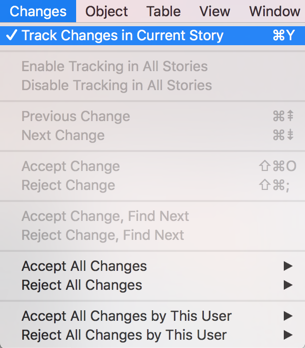
So if a Word user tries to use that shortcut in InCopy, what they’re really doing is enabling or disabling track changes in the current story each time they use that keyboard shortcut. Now eventually, the user will realize that cmd/ctrl + Y isn’t performing the task that they expect, but in the short term this seemingly innocent mistake can yield unpredictable results for teams who are depending on the changes in text being tracked in the story. So keep an eye out for this and make it a training point for new users to InCopy.
This article was last modified on July 9, 2020
This article was first published on January 23, 2018
Commenting is easier and faster when you're logged in!

Recommended for you

How to Paste Tables from Microsoft Word or Excel into InDesign
Learn the simple trick for pasting tabular data from Microsoft Office apps into...

Import Word Documents, Edit in Word and InDesign, and Keep Linked for Updating
If you work with Word documents, you want this. Now.

CreativePro Video: Extract Images From a Word Document
In this week’s CreativePro video, Renée Brisson-Khan demos how easy it is to ext...