


Flash Catalyst CS5: First Impressions


The lines between industries and positions are so blurred in today’s market that many graphic designers are called on to produce Web sites, videos, and interactive multimedia — and sometimes all at once. Flash can handle part or all of these tasks, but what if you don’t enjoy the analytical programming it requires? Then you may be a candidate for Adobe Flash Catalyst CS5.
The $399 Flash Catalyst is an exciting product: a new Adobe application that produces Flash content without programming. In this article, I’ll explore the strategy behind the creation of Flash Catalyst, show how it relates to Flash Professional and other products in the Flash Platform, and give my hands-on impression of the application.
Flash Catalyst CS5’s Place in the Flash Platform
Flash Catalyst is only one application in a family of products that Adobe calls the Flash Platform. Understanding how they relate to one another is important when selecting the right application to handle your interactive projects.
Table 1. Where Flash Catalyst Fits In
|
Flash Catalyst CS5
|
Flash Professional CS5
|
Flash Builder 4
|
|
|---|---|---|---|
|
Product position
|
Entry level
|
Professional
|
Developer
|
|
User base
|
Interactivity novices
|
Creative pros working in multimedia
|
Developers
|
|
Project types
|
Interactive graphics
|
Animation, interactive applications
|
Data-driven applications
|
|
Code language
|
MXML
|
ActionScript
|
MXML, ActionScript
|
|
Output formats
|
Flash Player, AIR
|
Player, AIR, Lite
|
Flash Player, AIR
|
|
Project structure
|
Pages, states
|
Timelines, frames
|
Projects
|
|
Integration
|
Editable with Flash Builder
|
Editable with Flash Builder
|
Editable with Flash Professional
|
Flash Catalyst is the entry-level product in the Flash Platform lineup. It’s the only Flash application designed for users who can’t write code and prefer to create graphics and prototypes in Photoshop and Illustrator, which Flash Catalyst works with easily. Its page-based project structure doesn’t compare to any other Flash Platform product and is most closely related to page-based features of other applications, such as Photoshop’s Layer Comps panel.
Another notable difference is Flash Catalyst ‘s integration with Flash Builder 4 but not Flash Professional CS5. Flash Catalyst outputs only FXP files, which can be imported into Flash Builder 4 and edited there as an MXML project. Flash Professional doesn’t read FXP files and has no integration with Flash Catalyst. I think this is a bad decision on Adobe’s part because every CS5 suite that includes Flash Catalyst also includes Flash Professional. Flash Builder 4 is only available in the CS5 Web Premium and Master Collection suites. There’s no way to prototype a project in Flash Catalyst and then add extra features and polish in Flash Professional.
You may have heard about Adobe’s “Business Catalyst” product. Although the similar names are confusing, Business Catalyst has nothing to do with Flash Catalyst. Business Catalyst is a hosted service that provides several Web services suitable for business, such as e-commerce, e-mail, Web analytics, and customer data management.
Figure 1. The Business Catalyst panel in Dreamweaver CS5 is unrelated to Flash Catalyst.

Hands-on Impressions
Flash Catalyst is a good start on an application that can produce common Flash interactivity without programming, but many users will be limited by its small feature set.
Figure 2. Flash Catalyst’s user interface is clean and easy to navigate even with complex projects. However, this is partly because the application doesn’t have the capabilities of Flash Pro CS5 and other mature Adobe products. Click the image below to see a larger version.

Flash Catalyst has the smallest toolbar of any Adobe application I own, with only eight tools for navigation, zoom, shapes, and text. This practically requires you to build assets in Photoshop or Illustrator. Flash Catalyst’s timeline actions and button interactions are also meager, with only the most basic Flash actions:
• Play, pause, and stop video
• Play, pause, and stop SWF files or go to a specific frame
• Change a component’s state
• Change or fade opacity
• Add a sound effect
• Move, resize, and rotate objects
• Rotate an object in 3D space
Every Flash project I’ve worked on has required more than this set of actions. This could be an opportunity for third-party developers to build actions for Flash Catalyst; however, I don’t know if the application will allow additional actions to be installed. Flash Player and AIR supports all the Flash actions, so the only obstacle seems to be the application itself.
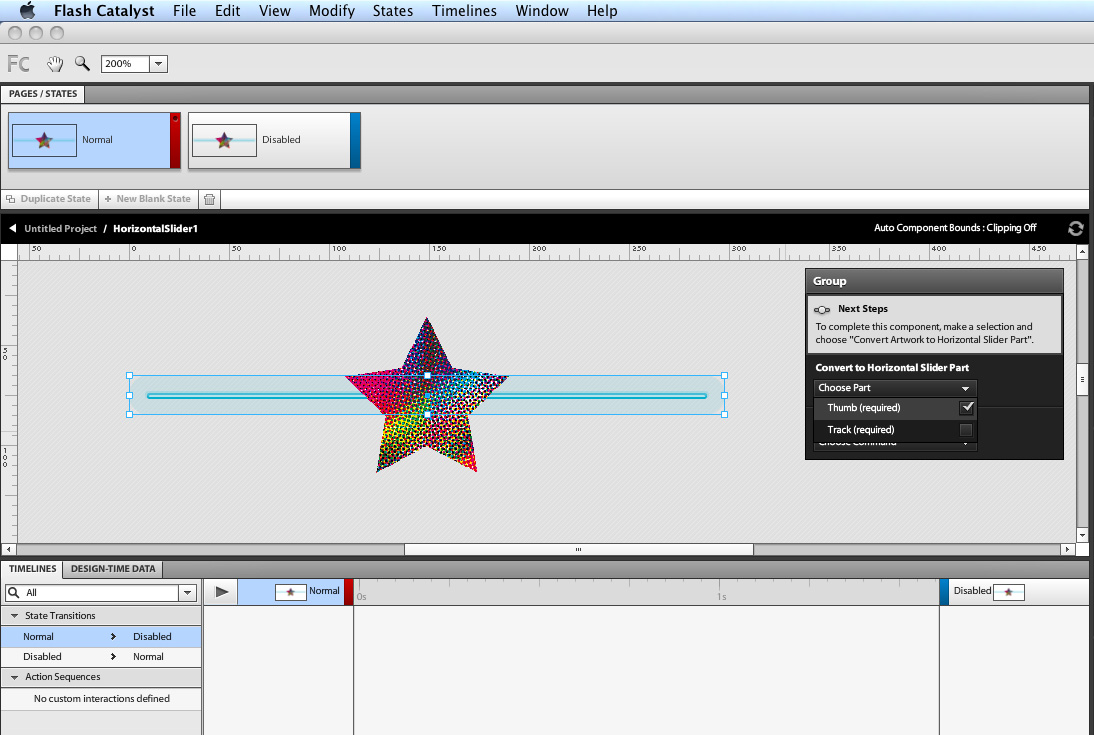
One area where Flash Catalyst shines is its ease of use setting up Illustrator graphics for wireframe components. Flash Catalyst ships with a small but adequate set of components for forms, such as scrollbars and buttons, but you can also import graphics from Illustrator and Photoshop and convert them into functional form components. While the conversion process can be a little tedious, it’s simple, and the freedom of building a scrollbar from scratch and making it function in a Flash product in just a few steps is satisfying.
Figure 3. The Wireframe Components included with Flash Catalyst provide many components necessary for building forms and navigation.

Figure 4. I’m most impressed by Flash Catalyst’s ability to turn Illustrator graphics into functional Flash components. The heads-up display (HUD) on the right assists you during the process. Click the image below to see a larger version.
I also tested the possibility of moving assets between Flash Professional CS4/CS5 to Flash Catalyst. Unfortunately, the FXPL file that Flash Catalyst produces when exporting libraries works in Flash Builder 4 but not Flash Pro CS4 or CS5. Similarly, Flash Pro CS4 and CS5 have no method to export libraries. However, Flash Pro CS4 can export assets — including shapes, symbols, bitmaps and vector graphics — as images that Flash Catalyst can import. Flash Pro CS5 also has a new Export Selection command for exporting more than just images, and both that and the Export Image command can output FXG files (the Flash graphics interchange format that Flash Catalyst and Flash Builder 4 can both read). Flash Catalyst has no exporting functions and can’t do the same.
Flash Catalyst reminds me less of Flash Professional CS5 than it does a bundle of features from other Adobe applications. Photoshop’s Layer Comps panel shows, hides, and moves layers the same way Flash Catalyst handles elements to create multiple pages. ImageReady, a discontinued Adobe application for building animated GIFs, featured the multi-frame projects and transition tweening that Flash Catalyst CS5 now employs. And Flash Catalyst’s Timelines panel feels like a simplified version of the Animation (Timeline) panel that’s been in Photoshop since CS3, which itself is a simplified version of the After Effects timeline.
Figure 5. Flash Catalyst’s Timelines panel differs from the Flash timeline in several ways. For example, it’s designed to apply actions to transitions between pages or element states, not to individual objects or symbols. Click the image below to see a larger version.

I understand the need for Flash Catalyst to be simple, but along the way it lost the toolset necessary to build robust Flash experiences. Instead of the fluid and interactive animations of Flash Professional CS5 or the elegant dynamic applications of Flash Builder 4, Flash Catalyst produces frame-based graphics with basic Flash transitions and interactivity.
Still, it may gain a niche market among designers who refuse to write code and who can get by with only the most basic of Flash interactivity. I expect many other designers will take the next step and try using Flash Professional.
This article was last modified on January 8, 2023
This article was first published on April 14, 2010
Commenting is easier and faster when you're logged in!

Recommended for you
How to Balance Text Columns Automatically and with Baseline Grid
Bring balance to your InDesign spreads with this Text Frame Option.

Making Tables Accessible
Learn how to correctly tag complex PDF table headers for screen readers with Dax...
Essential Illustrator Shortcuts
Save time with Kat Kremser's cheat sheet of Illustrator shortcuts!