




Perfection itself is imperfection. – Vladimir Horowitz
Most of the time, the level of perfection that computers allow us to achieve is a wonderful thing—and something we take for granted. Effortlessly, we draw perfect circles and squares, set type on perfectly straight lines with perfectly straight margins, and perfectly consistent leading. And this is all a good thing. But once in a while you might need to take a break from perfection and give your design a more organic, human touch. And when you do, you should check out the Humane Type script by Beetroot Design.
This free script has two main functions, humanizing body text and titles. When you run the script, you get a palette where you can set the parameters for both functions.
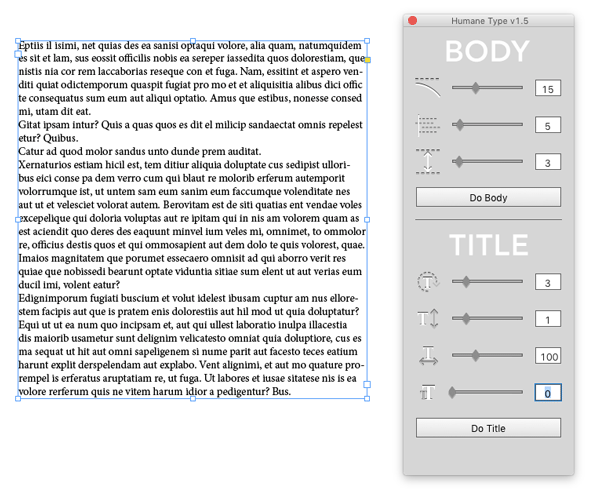
With body text you can select a frame containing text and randomize the margins and line spacing, and bend lines.
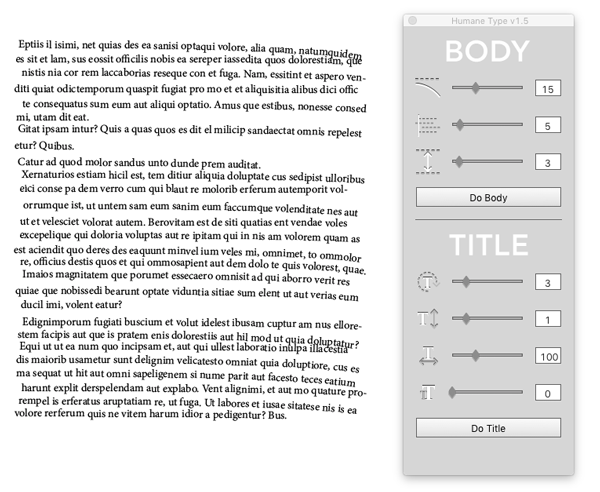
The script achieves the bending effect by putting each line of type on a curved path.

For title text, you make a selection within a text frame and choose how much you want to rotate, scale, and space your type.
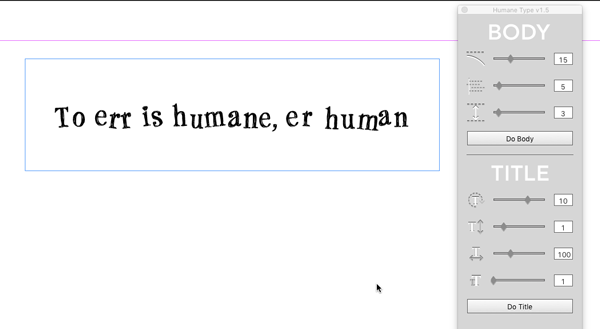
So the next time you want to give your designs some well placed flaws, you can do it perfectly.
This article was last modified on July 25, 2019
This article was first published on May 18, 2016
Commenting is easier and faster when you're logged in!

Recommended for you
Magazine PIB Ad Revenue and Pages Increase for the Sixth Straight Month
Total magazine rate-card-reported advertising revenue for the month of July incr...

How to Create Long Shadows on Editable Text in PowerPoint
Learn how to create long text shadows in PowerPoint and keep the text editable.

The CreativePro Weekly Top 10, vol. 4
More marvelous miscellanea for you to contemplate and click. 1. Need a place to...