


A Script for Styling Punctuation in InDesign
This free script formats punctuation to match the text immediately before and after it.


InDesign users, have you ever received manuscript where certain text was formatted with bold or italics but the adjacent punctuation was not? It’s a common problem. And until now, there was no simple solution. You can’t use a Find/Change or GREP style to make the punctuation match the text formatting. So, dealing with this kind of stuff was usually a tedious manual task. But now there’s a free script to handle the issue, thanks to Masood Ahmad.
Just run the script and you can tell it the scope you want to address (a selection, story, or the entire document).
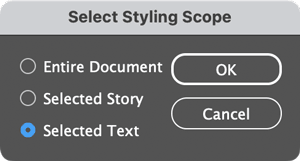
Click OK and all punctuation in the scope you choose will be formatted the same as text immediately before or after it. This includes local overrides and formatting applied via character styles.
To download the script, click the green button at the top of this page.
Thanks, Masood!
This article was last modified on October 6, 2025
This article was first published on October 6, 2025
Commenting is easier and faster when you're logged in!

Recommended for you

The Interrobang Is 60?!
A look at the history and usage of the obscure mashup of an exclamation point an...

Where Is My Text? Text Disappears When Over Background Object
Here's an InDesign "feature" that frequently bites new users: text disappears wh...

Tackling Tables through Scripting
Tackle tables through Javascript, for instant formatting. And a bonus: download...