



It’s time to reveal the solution—and the winner—for this month’s InDesignSecrets contest!
Here’s the scenario:
You a receive a layout file for a long document set up with facing pages. You open the Pages panel and see that several spreads have the page numbers separated by commas instead of dashes.
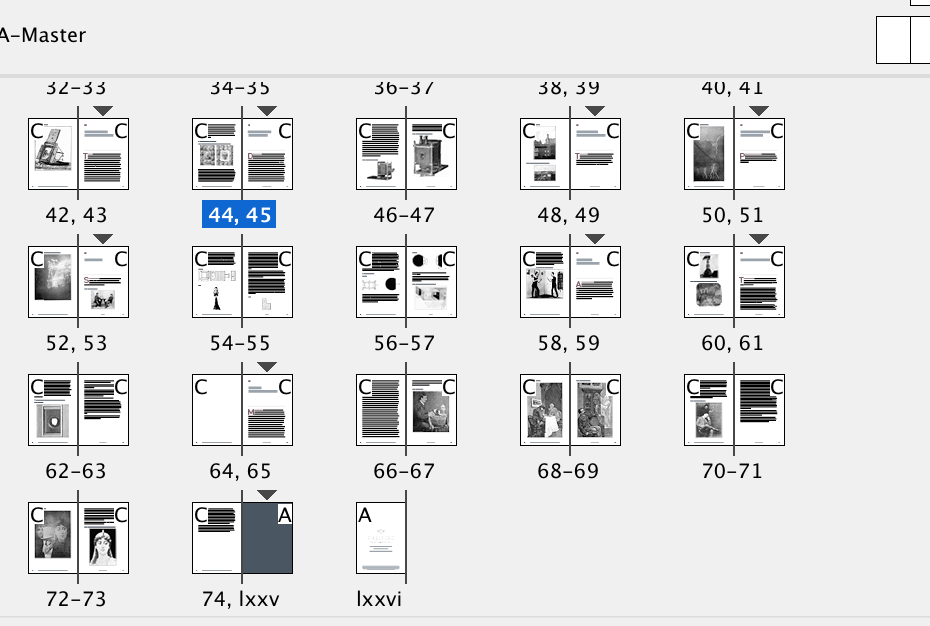
Why are some page numbers separated by commas?
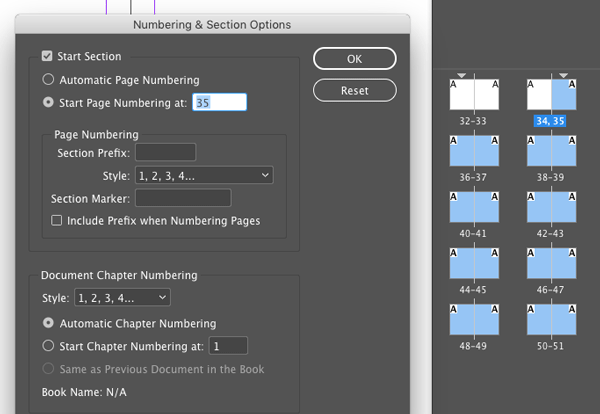
Solution: The commas indicate section starts. You can use section starts to change the value or style of page numbering, or to add section markers to the pages.
And the winner of this contest is…
Mike Demaine
Mike wins 3 months access to videos of any 2 days of CreativePro Week 2017.
Thanks to everyone who entered, and be on the lookout for another contest with a new great prize next month!
This article was last modified on July 25, 2019
This article was first published on September 28, 2017
Commenting is easier and faster when you're logged in!

Recommended for you

The Mystery of the Empty Swatches Panel Contest Answer and Winner
Solve this InDesign mystery for a chance at winning a great prize.
New Contest! The Puzzling Pasted Text
Solve this InDesign mystery for a chance at winning a great prize.

Use Numbered Lists Instead of Auto Page Numbering
Sure, InDesign has an automatic page number feature. But sometimes other numberi...