




Ever wish you could reset the list of recent documents in InDesign’s File menu? Here’s how.
In the File Handling area of InDesign’s Preferences dialog box (File > Preferences > File Handling), set the Number of Recent Items to Display to zero. Click OK to close the dialog box.
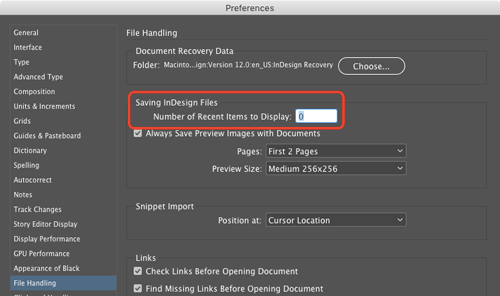
Then, reopen Preferences and change the number of Recent Items to Display to whatever you want. You don’t need to quit and restart InDesign. You’ve now erased the old list of documents and InDesign will keep track of the list of documents you open from that point forward.
This article was last modified on December 16, 2024
This article was first published on June 6, 2017
Commenting is easier and faster when you're logged in!

Recommended for you
Use Split Window when Applying Colors to Text
How to fix the problem of seeing selected text in inverted colors in InDesign.

How to Change the Default New Document Preset in InDesign
Learn how to customize the New Default Document preset in InDesign CC 2019

InDesign Magazine Issue 136: Advertising
We’re happy to announce that InDesign Magazine Issue #136 (August 2020) is now a...