



Hey folks, it’s time for another InDesign mystery that you can solve for a chance to win an awesome prize!
Here’s the scenario:
You’re hired for a job to update a nature guide that was published as an interactive PDF. A typical entry looks like this:

To update the design, you’ve been asked to remove the colored diamond shapes and move the name of the animal down so it overlaps the photo.
But when you move the text frame down, the parts of the letters that overlap the photo vanish.
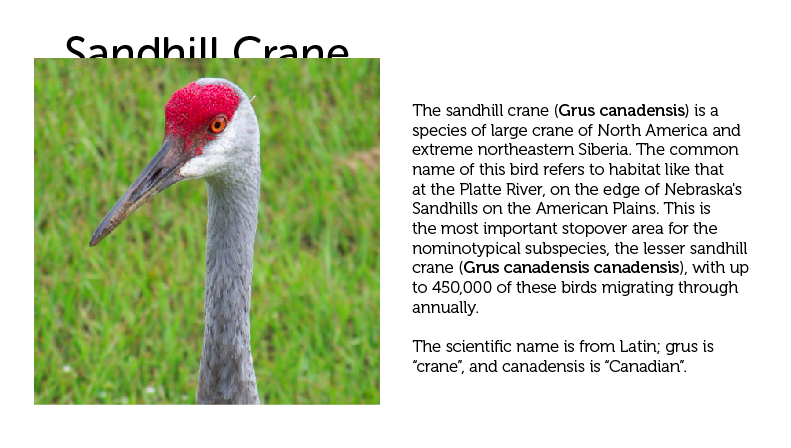
It looks like the text frame is beneath the photo, but you check the Layers panel and that’s not the case.

Everything on the page is on the same layer, and no text wrap has been applied anywhere.
Why did the text vanish when it was moved over the photo?
If you’re stumped there is a clue in the first screenshot.
This month’s prize is full access for 3 months to the video archives for PePCon 2016 or the CreativePro Conference (up to $495 value!).
The winner will be chosen at random from all the correct answers I receive before February 15, 2017
Enter now by emailing your solution to mike at indesignsecrets.com
Note: Comments are closed on this post so no one gives away the answer. Good luck!
This article was last modified on July 25, 2019
This article was first published on February 8, 2017
Commenting is easier and faster when you're logged in!

Recommended for you

New Contest! The Case of the Curious Comma
Solve this InDesign mystery for a chance at winning a great prize.

Limiting Matches with GREP in InDesign
Peter Kahrel shares a technique for targeting a specific instance in a repeating...
The Inconsistent Indent Contest Answer and Winner
Solve this InDesign mystery for a chance at winning a great prize.