




Susie wrote:
Can I do a full depth table in A4? It seems to be limiting me to 21.1 cms
Susie, it’s easy to do a table as long as an A4 page… as long as there are more than one row. But I’m guessing you’re wanting a single row to be taller than 21.1 cms or 50 picas. That’s the maximum height of a table cell by default.
Fortunately, you can change this if you know where to look. Select the cells you want to edit with the Text tool, then choose Table > Cell Options > Text (or press Command-Option-B/Ctrl-Alt-B). Now click on the Rows and Columns tab.
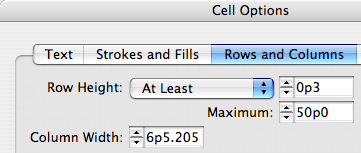
Notice the Maximum value? If you increase that, your cells can be taller. Like so much in InDesign, it’s frustrating until you see it done once!
This article was last modified on December 18, 2021
This article was first published on October 21, 2006
Commenting is easier and faster when you're logged in!

Recommended for you

dot-font: A New Face for Small Text
dot-font was a collection of short articles written by editor and typographer Jo...

InDesign Magazine Issue 150: All-Star Tips
Issue 150 has all-star tips and tricks, overlooked features hidden in plain sigh...

Book Design Template
Time for another exclusive template for our Premium members! (Not a Premium memb...