



Susie wrote:
Can I do a full depth table in A4? It seems to be limiting me to 21.1 cms
Susie, it’s easy to do a table as long as an A4 page… as long as there are more than one row. But I’m guessing you’re wanting a single row to be taller than 21.1 cms or 50 picas. That’s the maximum height of a table cell by default.
Fortunately, you can change this if you know where to look. Select the cells you want to edit with the Text tool, then choose Table > Cell Options > Text (or press Command-Option-B/Ctrl-Alt-B). Now click on the Rows and Columns tab.
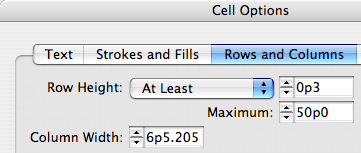
Notice the Maximum value? If you increase that, your cells can be taller. Like so much in InDesign, it’s frustrating until you see it done once!
This article was last modified on December 18, 2021
This article was first published on October 21, 2006
Commenting is easier and faster when you're logged in!

Recommended for you

Making an Animated Route Map
Remember those cool flight maps from Raiders of the Lost Ark and the other India...
Give ColorSync a Chance
If you’ve had enough of Harry Potter and want a little more scintillating...

Flattener or Blatner Preview?
So I was listening to the latest ID Secrets Podcast and the topic of the Flatten...