




This CreativePro Tip of the Week on Making Dotted Lines in Illustrator was sent to CreativeProse email subscribers on October 18, 2017.
Sign up now and every week you’ll get a new tip, plus roundups of new articles, and exclusive deals sent right to your Inbox!
Just scroll down to the bottom of this page, enter your email address, and click Submit! We’ll take care of the rest. Now, on with the tip!
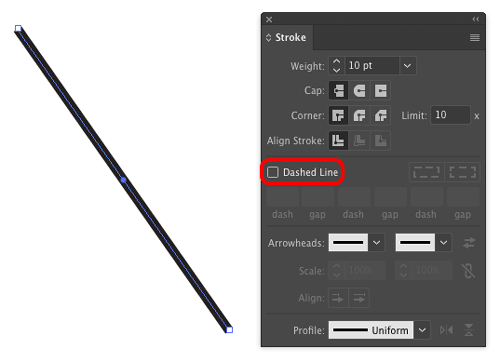
Need to make a dotted line in Illustrator? It’s not obvious how to do it. One way is to turn on the Dashed Line option in the the Stroke panel.
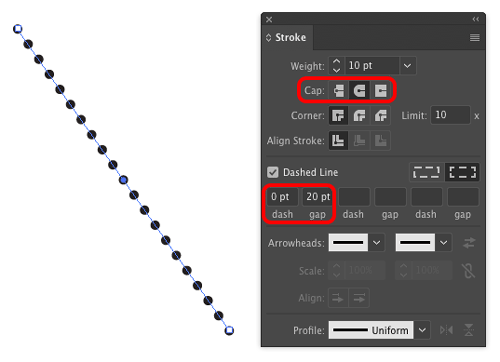
Then set the Cap to rounded, the Dash value to zero, and the gap to double the stroke width.
This article was last modified on December 7, 2017
This article was first published on December 7, 2017
Commenting is easier and faster when you're logged in!

Recommended for you

Tapping Into Illustrator’s Appearance Panel
Even the most beginner user among us knows that when we create a vector shape in...
CreativePro Tip of the Week: Drawing Instant Abstract Art in Illustrator
This CreativePro Tip of the Week on creating instant abstract art in Illustrator...

Building an Isometric Timeline of Modern Milestones in Design and Publishing with Illustrator
Anticipating another great CreativePro Week in Seattle, I was excited to get a c...