




B. wrote:
My employer recently instituted a new rule at our agency that requires us to include, among other things, the complete file path of the InDesign file on all proofs. Obviously, this isn’t part of the info included in the “File Information” option in the Print Dialog. Do you know of any way to automatically add the file path when printing?
While there are some very good plug-ins that can help with this kind of thing (those from Triple Triangle and Gluon come to mind), it’s extremely easy to do this in InDesign CS3 without any help from outside sources. The trick is to use text variables.
First, choose Type > Text Variables > Define. Click New and choose File Name from the Type pop-up menu. Pretty cool, but before you click OK, note that you can select the Include Entire Folder Path checkbox!
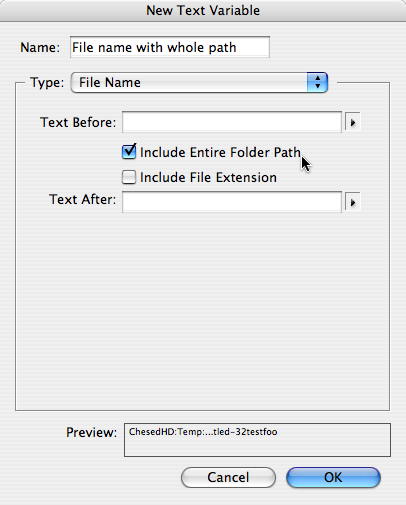
Now click OK. From the Define Variable dialog box, you can click Insert to tell InDesign to “type” the variable right away at the current text cursor position. Or you can click Done. When you want to insert the variable (perhaps in a slug area off the side of the page), you can choose Type > Text Variables > Insert Variable > and then choose the name of the variable you defined.
By the way, you may not see the variable update immediately. Text variables only update on screen when you change the view (zoom in/out, change pages, and so on). One other thing to watch out for: Variables cannot break across two or more lines. They’re always treated as a single character. So if your file path is really, really long, you might see some weirdness.
I love text variables; they’re incredibly helpful when you have data such as this that can change.
This article was last modified on December 19, 2021
This article was first published on July 1, 2008
Commenting is easier and faster when you're logged in!

Recommended for you
Better first proofs. Fewer review rounds. Introducing PreProof™
Most designers are already familiar with Preflight — checking a document for tec...
Adding and Styling Text in Premiere
Myra Ferguson covers text formatting and safe margins in Premiere.
Create Flawless Fractions with OpenType
Choose your font carefully if you need flawless fractions!