




Perhaps the biggest transition when moving to InDesign from XPress is the difference between the programs’ selection tools. Instead of the Item and Content tools in XPress, InDesign has Selection and Direct Selection tools.
It’s actually not too difficult to make the transition if you just remember the following:
The Selection tool acts like the Item tool. When a graphic frame is selected, the Selection tool selects the item as a whole–this includes the frame as well as any image inside the frame (see figure 1). When a text frame is selected, the Selection tool selects the frame as a whole.
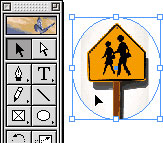
Fig 1
The Direct Selection tool acts like the Content tool. When a graphic frame is selected, the Direct Selection tool allows you to move any image placed inside the frame (see figure 2). Just move the cursor inside the frame and press with the Hand cursor as you would in XPress.

Fig 2
However, things are different when it comes to text frames. In XPress, the Content tool automatically switches to an insertion point when moved over a text box–not so in InDesign. In InDesign you need to switch to the Text tool to obtain access to the content of a text frame.
Read more On the Move to InDesign tips here.
Read more by Sandee Cohen.
This article was last modified on March 10, 2025
This article was first published on March 20, 2002
Commenting is easier and faster when you're logged in!

Recommended for you

Setting InDesign’s Display Performance
I spend a lot of time helping people troubleshoot their InDesign files. I love t...

Creative Blöks: The Perfection Fairy
Each step you take on a creative path—whether you’re designing, drawing, or deve...

Creating Light and Shade in Photoshop with Levels Adjustment Layers
Learn a great technique for making the subject match the background lighting in...