



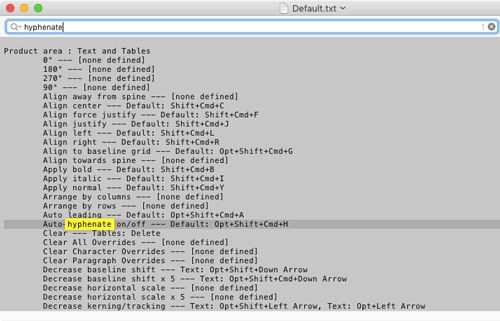
What do you do when you can’t remember a specific keyboard shortcut in InDesign? Google it? Go to the Help? One method you can use to see a list of all your current keyboard shortcuts (including any you’ve customized) is to choose Edit > Keyboard Shortcuts. You can click around in this dialog box to select menu items and commands and see the shortcuts for each. But if you click on the Show Set button, it opens a list of your shortcuts in a plain text file that you can search for elusive items.
This article was last modified on March 4, 2023
This article was first published on December 31, 2018
Commenting is easier and faster when you're logged in!

Recommended for you
Secrets of the Control Panel Revealed
The Control panel is teeming with hidden shortcuts to other panels, preferences,...

Tip of the Week: Adding Keyboard Shortcuts for Alignment Commands
This InDesign tip on adding keyboard shortcuts for alignment commands was s...
Balancing Text Columns in InDesign
Did you ever resize a multi-column text frame to balance out the depth of the te...