




This InDesign tip on locking first line to baseline grid was sent to Tip of the Week email subscribers on August 16, 2018.

Sign up now and every week you’ll get a new tip, keyboard shortcut, and roundups of new articles, plus exclusive deals sent right to your Inbox!
Just scroll down to the bottom of this page, enter your email address, and click Go! We’ll take care of the rest. Now, on with the tip!
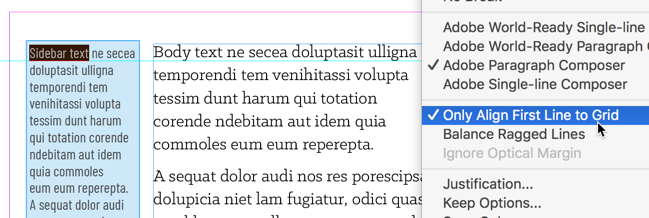
Often, sidebars in magazines or newsletters are set in a different font and leading than the main body text. You can make the first baseline of that sidebar lock to the leading grid by first turning on Align to Baseline Grid for the whole paragraph, and then selecting Only Align First Line to Grid from the Paragraph or the Control panel menu.
This article was last modified on July 7, 2021
This article was first published on August 22, 2018
Commenting is easier and faster when you're logged in!

Recommended for you

Livestream Video: Creating 3D Lettering Using Illustrator’s Inflate Tool
Join Khara Plicanic as she shows how to create stunning 3D lettering with Illust...
How to Work with Illustrator’s Effects
Learn how to work with effects in Illustrator and make further adjustments, incl...
Tips to Control Photoshop Layers
Khara Plicanic shares smart Photoshop Layers panel tips to help you find and man...