


ZBrush 1.03: Paint Your Way to 3D


Brushes with Greatness
ZBrush offers a comprehensive selection of highly specialized brushes. The Hook brush, for example, allows you to pull and push Pixols as though they were putty. The Fiber brush lets you add textures — like hair or fur — to existing surfaces. And the Bump brush can change the depth of the picture based on a specified alpha-channel image. These types of tools, coupled with the ability to assign surface reflections and transparencies, allow ZBrush to create very sophisticated effects.
If you desire, you can create an entire painting using only the freeform brushes. However ZBrush also provides geometric primitives such as sphere, cube, and cylinder. When using the geometric tools ZBrush makes traditional 3D-modeling functions available. These functions include XYZ transformations, Boolean operations, and mesh deformations. For example, you can rotate a cube in 3D space, cut a cylindrical hole through a sphere, or push and pull the surface of an object as though it were clay. But be warned: These functions are only available when you first create a geometric primitive. The minute you change the program’s focus (by creating another object, for example) you have effectively converted the geometric primitive into Pixols, and you can no longer go back to using 3D transformations. This can be confusing for novice users, given that geometric primitives and Pixol-based shapes look the same but behave differently.
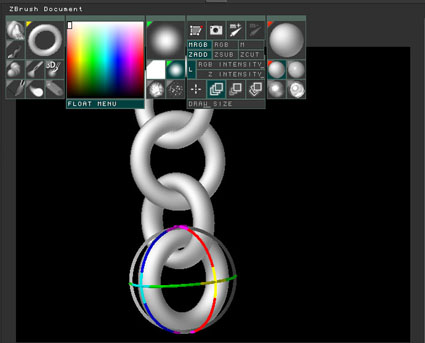
ZBrush provides a number of true 3D geometric primitives, such as the torus shown here. Notice the gyroscope, which allows you to rotate the current geometric primitive in 3D space.
In order to preserve depth and surface material information, you must save your creations in the ZBrush format — ZBR. However, you can easily export a ZBrush scene to any of standard graphics formats, which run the gamut from 2D raster data (such as TIF or JPEG) to editable 3D data (such as DXF or OBJ). The export function is especially important because ZBrush lacks an internal print command: To generate hard copy of a ZBrush scene, you must export it to another graphics program, such as Adobe Photoshop.
Mixed Bag
We found the program’s performance and its underlying technology to be very impressive. The compressed program files download quickly from the Pixologic Web site. And once the files are decompressed the program is ready to run — without requiring any lengthy installation process. ZBrush requires a substantial amount of memory (128MB of RAM or virtual memory for either Windows or Mac OS), but the tools are amazingly responsive. ZBrush provides instant feedback as you paint and sculpt surfaces. Indeed working with ZBrush’s tools can feel very natural — as though you are molding clay or laying down impasto paint.
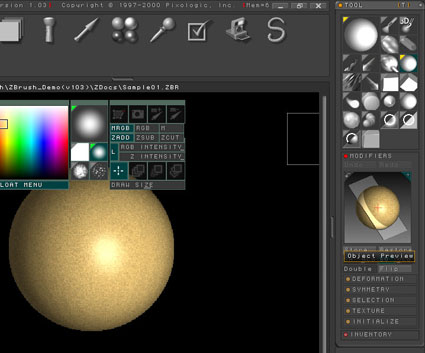
Each tool in ZBrush can be configured in a number of different ways. Here, the Modifier sub-palette displays a preview of the 3D Sphere tool showing its texture, base color, and relation to the picture plane.
But the fact that the tools feel natural does not always compensate for the fact that they are hard to find and even harder to configure. Indeed, the chief liability of this software is its idiosyncratic interface. The workspace consists of a central canvas, which is flanked on the right and left by a number of interdependent palettes. The palettes can be opened, closed, rearranged, and even collapsed into icons, which in turn are stored in a bin at the top of the screen. So far, so good, and experienced users will be able to navigate these palettes in order to set the myriad options that control tool and brush behavior. But the complexity of the program (where eight different palettes can affect the way paint is laid down) and the non-hierarchical nature of the palettes (where important configuration options are often hidden in sub-palettes) make ZBrush unnecessarily difficult to learn.
ZBrush is also in need of more thorough, better-indexed manuals and tutorials. As we worked on this review, the PDF manuals available on the Web site were out of sync with the current version of the product. Pixologic is working on new documentation, much of which will be posted to the Web site in the next few weeks, according to a company spokesperson. In the meantime, ZBrush Central — an online community where users share their experiences — is an invaluable resource.
We took a sneak peak at a soon-to-be-released version of ZBrush (version 1.23) that promises a major improvement in the form of ZScripting. ZScripts are just that — scripts that control the program’s functions. They will allow developers to lower the learning curve with interactive tutorials and macros, though we did not test the scripting in depth. Pixologic said this release should be out this summer.
The Bottom Line
Anyone looking for a truly unique, creative painting tool should give ZBrush a whirl. Pixologic is offering a demo version of ZBrush for a 30-day trial period. All the program’s internal tools are fully functional in the demo version. However, you are limited to a canvas size of 640-x-480 pixels, as opposed to the 4,000-x-4,000 image size supported by the retail version. In addition, the demo version of ZBrush will only support the native ZBR format; the ability to export standard graphics formats is disabled. If you decide to purchase the program you’ll find that Pixologic is currently offering ZBrush at a special introductory rate of $292.50 (a 50-percent reduction from the retail price of $585).
Artists experienced with other 3D authoring tools will have a head start when learning ZBrush, because many of the concepts — mesh deformation, surface-material properties, texture maps, masks, and alpha channels — are the same as those found in conventional modeling and rendering programs. And the fact that ZBrush uses a familiar painting paradigm to create 3D objects will also appeal to 2D artists making the move into the third dimension.
But if you give this software a try, just be prepared for some frustration: Both experienced and novice 3D artists will find that the interface requires considerable time and determination to master. They will also find that the resulting images — with tangible volumes in a realistically rendered 3D space — are well worth the effort.
This article was last modified on January 18, 2023
This article was first published on June 26, 2001
Commenting is easier and faster when you're logged in!

Recommended for you

Editing Highlights and Shadows in Adobe Lightroom and Camera Raw
Adobe Photoshop Lightroom and Adobe Camera Raw have two sets of controls for mak...
Creating a Blend Mode Test Layer in Photoshop
Blending Modes use a top layer to change the appearance of the layer, or layers...

How to Clone a Row of Stormtroopers in Photoshop
Here’s how you can make your own Attack of the Clones in Photoshop, using the Cl...