



On October 14, 2008, Adobe released its CS4 versions of all of its Creative Suite software, including InCopy. And as they always do when they release a new version of the suite, they removed all previous versions from their store shelves at the same time.
So if you’re using an InDesign/InCopy CS3 workflow, and you need to get another copy of ID or IC for a new hire or to bring a new publication into the workflow, you’re a little bit stuck. (Unless you’re ready to move everyone—designers and editors—to CS4 at the same time.) That’s why one of the most frequent questions I’ve been getting lately is, “Can InDesign CS4 work with InCopy CS3?” while the second-most frequent one is, “Can InDesign CS3 work with InCopy CS4?”
The answers are “Yes” and “Yes” … but because of new file formats and extensions, you might have to modify the way you work.
InDesign CS4 with InCopy CS3
In layout-based workflows, editors open InDesign layout files (INDD) and edit the workflow stories within them. Even though InDesign CS4 files have the same INDD file extension as CS3, InCopy CS3 cannot open InDesign CS4 layout files. If you try, you’ll get an error:
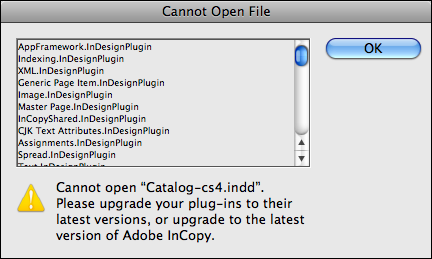
The only way to allow InCopy CS3-using editors to continue working with CS4-using designers is to provide them with Assignment files instead of having them work directly on the layout.
Even if you’re already using an Assignment-based workflow (editors open INCA files instead of the actual INDD layout), InDesign CS4 users will need to pay attention, as Assignment files have changed file extensions and formats in CS4.
You must be careful to make assignments and their stories compatible with CS3. Otherwise, they’re created and exported in the new CS4 formats—ICMA (assignments) and ICML (stories)—which InCopy CS3 cannot open. (Adobe changed the file formats to make them more accessible to XML editors outside of the programs … a topic for another post.)
You make assignments compatible with CS3 when you create them, by choosing that option in the New Assignment panel in InDesign CS4:
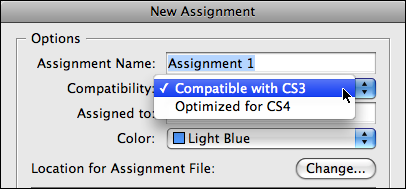
If you had selected frames in the CS4 layout file at the same time you created the new assignment, the external InCopy files that InDesign CS4 exports and includes in the assignment will also be compatible with InCopy CS3. That is, InDesign will export them with an INCX (InCopy CS3) extension instead of ICML (InCopy CS4). Otherwise, creating “Optimized for CS4” assignments automatically exports stories to ICML format.
If, on the other hand, you export stories as a separate step (dragging them from Unassigned InCopy Content to the Assignment name in the panel afterwards), when you export them you need to make sure to choose the InCopy CS3 format in the Export to InCopy dialog box:

So, let’s say you have just one editor who’s working on a publication. Assignments, which help you split up a large publication into editor-specific layout files, don’t make much sense in that workflow. To keep things simple, all you need to do is to create a single assignment that is the entire layout. You could choose Edit > InCopy > Add All Stories to Assignment > New, for example, being sure to specify Compatible with CS3 in the New Assignment dialog box as shown above. Tell your editor to open the INCA file instead of the INDD file, and you’re good to go.
In fact, even if you do have two or five editors working on the same publication, you could still create a single assignment that is the entire layout and have them work on it concurrently. It’s a little-known fact that multiple editors can open the same assignment (INCA or ICMA) at the same time, just as they can with INDD files. After they open it, all workflow stories within it will be accessible to them, and the usual rule of “one user per checked-out story” still applies.
By making the Assignment compatible with CS3, you can be assured that any email-based assignment packages you create can be opened by remote editors using InCopy CS3. (Yes, packages also got new file formats in CS4.)
InDesign CS3 and InCopy CS4
It’s a lot easier to work with this combination. InCopy CS4 can open InDesign CS3 layouts (INDD) and the InCopy files that InDesign CS3 exports: stories (INCX), assignments (INCA), and packages (INCP). When the InCopy CS4 user saves changes to these files, they’re saved in the same format they were opened in automatically, without them having to choose any specific format. That means that other InCopy CS3 users and InDesign CS3 users on the team should have no issues working on files that the InCopy CS4 user worked on.
The one time that InCopy CS4 users might have to be careful is when they’re working on a stand-alone InCopy file, one that they’ve created (File > New) or one that they’ve opened directly from a publication’s “content” or “stories” folder. After editing the file, when they save their changes (or close it with unsaved changes), InCopy will put up a “Save As” dialog box. This is because it wants to save the document in the new InCopy CS4 format.
Assuming the InCopy user doesn’t want to do that, they should be sure to choose the “InCopy CS3 Interchange” format in the dialog box before hitting the Save button:
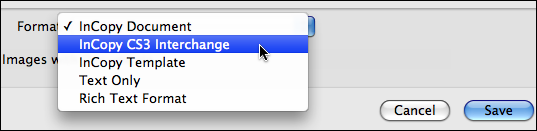
Doing so saves the standalone document in CS3-friendly INCX format instead of the new ICML format.
Are you using a mixed-version workflow? I’d love to hear how it’s going for you … add your comment below!
This article was last modified on December 19, 2021
This article was first published on November 18, 2008
Commenting is easier and faster when you're logged in!

Recommended for you

Managing Tips Between Numbered Lists
You don't want to have to reset numbers manually when two numbered lists collide...

Going Deep with Footnotes
Whether you're explaining, referencing, or elaborating, footnotes and endnotes a...

FontExplorer X Client and Server Now Available
Linotype GmbH and its parent company, Monotype Imaging Holdings Inc., have colla...