



Return to page 1.
Step 10
When you write a blog post, it’s important to give it a category and some tags. Categories describe the post’s content. Tags also describe the post, but they can be more specific, since you usually assign more tags than categories to a post. For example, if you were posting a review of a nature photography book, the category could be “nature photography” or “book reviews,” but the tags could include the book’s author, the locations of the shoot, the equipment used to capture the photos, and so on.

Type some tags into the space, separate them with commas, and click Add. Add a new category or two; from now on, the category will be listed so you can check it when you post similar content.
Step 11
Once you’ve typed the text, inserted images, and set categories and tags, click on Publish.
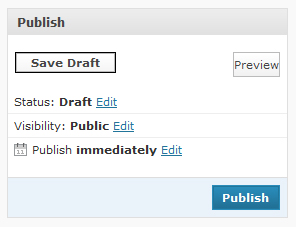
Just like pages, you can edit the Status and the Visibility. But you can also set it to be published at a specific day and time, instead of immediately.
In Part 2 of this tutorial, I’ll lead you through adjusting the settings of a WordPress blog, as well as the plug-ins, themes, widgets, and template/stylesheet editor.
This article was last modified on January 8, 2023
This article was first published on April 23, 2009
Commenting is easier and faster when you're logged in!

Recommended for you

Giving Back to the Troops
Whether you observe Veterans Day, Remembrance Day, or Armistice Day, November 11...

SmileOnMyMac Releases PDFpen 2.4.1 with Unicode Support and Reliability Enhancements
SmileOnMyMac has updated PDFpen, the PDF editing and form-filling utility, and P...

InDesign Magazine Scoops the Competition
InDesign Magazine, the complete resource for Adobe InDesign professionals, has p...