




The recent update of InDesign CC 2018 squashed many bugs, but it looks like it also introduced a new one. Windows users report that when they select some text and then start typing, the first character they type ignored (if it is a lowercase letter).
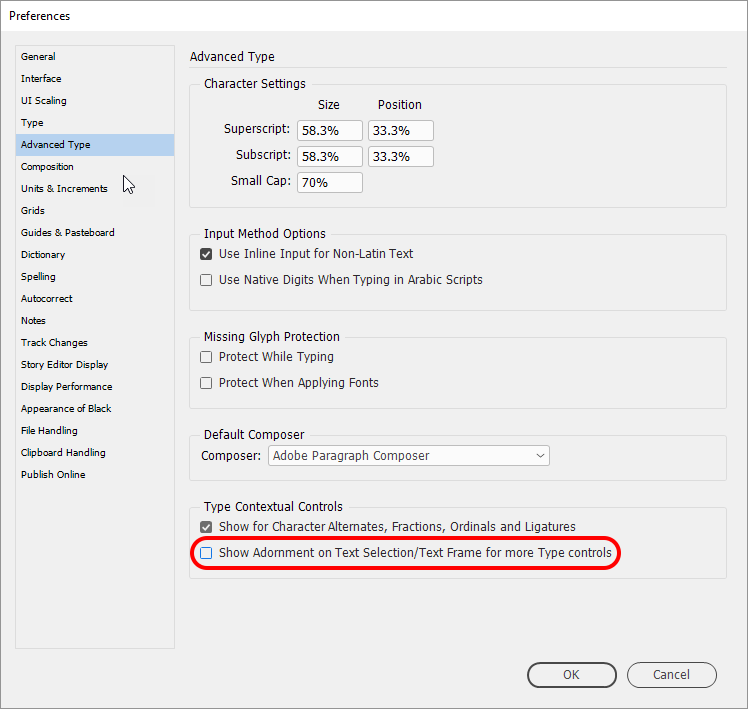
Fortunately, a quick fix has also been identified by the InDesign team. Turning off the OpenType text frame adornment makes the problem go away. To do this, open Preferences, and choose Advanced Type, then deselect Type Contextual Controls: Show Adornment on Text Selection/Text Frame, and click OK.
This article was last modified on July 20, 2021
This article was first published on March 15, 2018
Commenting is easier and faster when you're logged in!

Recommended for you

Tip of the Week: File Instant Bug Reports & Feature Requests With Quick Apply
This InDesign tip on how to file instant bug reports and feature requests w...

InDesign 17.2 Introduces New Bugs
At least two significant new bugs are being reported by users who have updated t...
CS5 bug with anchored objects on spreads
Beware of this bug that can make anchored objects fail to print or output to PDF...