



I field this question (see above) a lot — almost every day, in fact. That’s because there are plenty of “InCopy-curious” art departments in the world that use InDesign CS2. They’re not quite ready to move to InDesign CS3, or simply have no plans to do so, at least in this fiscal year… CS2 does everything they need to do.
The problem is that while Adobe recommends that InCopy workflow users keep InCopy and InDesign at the same version level, Adobe stopped selling InCopy CS2 back in April, when CS3 started shipping.
There’s not even an InCopy CS2 tryout available for these users to install on editorial workstations and test with their network and publications. (After which, they might be convinced to move to InDesign CS3 just to have parity with InCopy CS3, the only version available for purchase. Companies seldom move to this workflow without verifying that it works!)
Good News
The good news is that InCopy CS3 works fine for testing purposes with InDesign CS2. To prep a layout for InCopy, you’ll have install the free InCopy plug-ins into InDesign CS2 first, and export some of the stories in your layout to InCopy format, which turns them into editable “workflow” stories.
Then, install the InCopy CS3 tryout on your editor’s workstations, and they’ll be able to open the InDesign CS2 layout (.indd file) and edit the workflow stories within it, without any need to convert files or backsave them.
Stories exported to InCopy format from within InDesign CS2 are .incx files by default, the same as those exported to InCopy from within InDesign CS3 — there doesn’t appear to be any new features in the .incx format itself.
Similarly, InCopy CS3 can open Assignments (.inca files) created from InDesign CS2’s Assignments palette. Just make sure that everything’s saved to the server, and that the InCopy users are working off the server.
Check-in and check-out of stories, updating content and designs, sharing notes, tracking changes — all works just fine with InCopy CS3 and InDesign CS2.
Bad News
While mixing IC CS3 and ID CS2 is fine for testing, it’s not recommended as a permanent solution.
The main reason has to do with slight changes in the text composition engine between CS2 and CS3 (David and I talked about this in our recent podcast). For example, Adobe tweaked optical kerning to make it “more accurate” in CS3, as they mention in their InDesign CS3 Read Me document.
And as the Read Me goes on to explain; hyphenation exceptions, auto-numbered lists, and other internal text changes between the two versions may result in different line breaks when a CS2 layout is opened in CS3. The same glitches can occur when a story is shared between InDesign CS2 and InCopy CS3.
Here’s an example. In InDesign CS2 I created a test layout with one story (one text frame) exported to InCopy format. I filled the text frame with the same text that Dave Saunders provided in a comment to the InDesignSecrets podcast episode 54, showing one example of how CS2 and CS3 break lines differently.
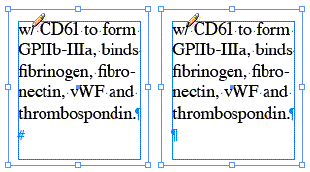
First, here’s the same block of left-justified text in InDesign CS2, before and after I forced the paragraph to recompose by clicking after its last character and pressing Return to start a new paragraph. As you can see, the line breaks remain the same:
I undid my edit (so the new carriage return was removed), checked the story in and saved the file. Then I opened the layout in InCopy CS3 and checked out the same “before” story.
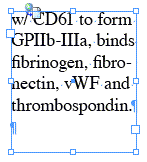
Nothing changed, the line breaks remained the same, as you can see on the left of the screenshot below. But as soon as I forced the paragraph to recompose (by again clicking after the last character and pressing Return), it used the CS3 engine to do so, resulting in quite different results — in fact, it caused an overflow — as you can see on the right:

You may be wondering what would happen if I saved that edited story in InCopy CS3 as-is, and then updated “the editor’s changes” in InDesign CS2. Check it out:
It added the additional Return character, but it completely ignored what happened to the recomposed line breaks in CS3. No more overflow!
While you may not be setting this particular type of text in your publication, and in fact you may encounter few examples of line break differences, the fact that it could occur will drive you and your editors mad.
Final Advice for InDesign CS2 Users
Go ahead and download the InCopy CS3 tryout if you want to see how it’d work on your network and with your publication. When you’re convinced it’s the way to go, lobby TPTB (the powers that be) for an upgrade to InDesign CS3. (Tell them about this text engine issue; also remind them that only InDesign CS3 supports off-site InCopy editors, maybe that will help too.)
If you must use InCopy CS3 and InDesign CS2 for real projects, I suggest you do a lot of testing first to see if how the text engine tweaks will affect your type of stories. Take a few of your recent InDesign CS2 layouts, export all the stories to InCopy format, and open the layouts in InCopy CS3 in Layout view.
After checking out a spread’s worth of stories in InCopy, press the keyboard shortcut for Recompose All Stories (Command-Option-/ on a Mac, Control-Alt-/ on Windows), and you’ll see right away if line breaks change. Do this for all the spreads you’re worried about, one spread at a time. This way, you can immediately see if any text rewraps without having to jump back and forth between InDesign and InCopy to verify line endings.
This article was last modified on December 18, 2021
This article was first published on July 18, 2007
Commenting is easier and faster when you're logged in!

Recommended for you

Snippet Style Injectors
Ever wish you could inject a combination of styles and swatches into a document?...
Everything Goes in Ukrainian
James Wamser, from Sells Printing in Wisconsin, sent us a great tip recently. A...
Changes in the Undo string
One of the more controversial changes in ID CS3 has to do with how the Undo comm...