




This is an increasingly common problem: InDesign users suddenly find that some (or all!) of their text highlighted in blue. For example, check out this image:

What on earth is going on?! The text is still editable, and the blue disappears when you export a PDF, print, or even just switch into Preview mode.
The answer is that you’ve enabled a feature inside the Paragraph Styles or Character Styles panel called Toggle Style Override Highlighter. It’s a button with a [+] icon, in the upper-right corner of the panel (and is also listed in the panel menu):
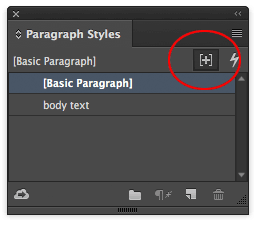
When that is on, InDesign highlights any text that has local formatting applied to it. Remember that “local” formatting is any formatting over and above the paragraph style. For example, if you select some text and change its size in the Control panel, that’s local formatting. If you change the first line indent of a paragraph, that’s local. However, if you apply a character style in the Character Styles panel, that is not local formatting.
In the first image above, the text in blue highlighting has character-level local formatting (such as a different font, size, leading, color, style, and so on). The text near the bottom (the paragraph that has a blue vertical bar to the left, just outside the text frame) has paragraph-level local formatting (such as a different indent, drop cap, or something like that).
The Toggle Style Override Highlighter feature is awesome because it lets you find local formatting really quickly. But if you don’t know why you’re seeing text highlighted in blue, it can be really confusing!
This article was last modified on July 25, 2019
This article was first published on August 10, 2016
Commenting is easier and faster when you're logged in!

Recommended for you

Free Webinar: InDesign Fixes for When Things Go Wrong
Learn practical troubleshooting techniques to diagnose InDesign problems, fix th...

Index Fixes: Sorting
InDesign doesn't distinguish letter-by-letter and word-by-word sorting, it suppo...
Don’t Ask Your AI to Identify a Font
When it comes to identifying typefaces in images, artificial intelligence isn't...