



I’m curious who among you has found InDesign snippets to be a welcome addition to your workflow and use it regularly. We use them here in our studio to quickly e-mail chunks of layout to each other and our clients for their re-use. But when I’m at an InDesign CS2-using client’s, and ask about this, 100% of the time (no exaggeration) the reaction is along the lines of “What are snippets?” or “Never found a need.”
For the uninitiated, snippets, available only in CS2, are like InDesign Library items that don’t need a Library to live in. Anything you could drag into a Library – a single text frame with formatted text, a group of objects making up a sidebar or a display ad, even all the items on a page – can be exported as a stand-alone Snippet file. Just make your selection and choose File > Export > InDesign Snippet.
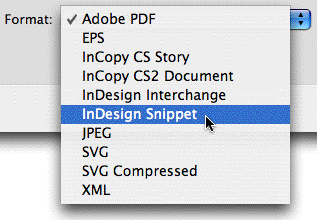
Snippets are saved with the file extension .inds. Once your snippet is created you can put it anywhere on your hard drive, or on your server for your colleagues to use, or e-mail it to someone else. To use the snippet in another InDesign CS2 file, just import it via File > Place. Any styles (text or object) or colors that were applied to object in the snippet also come along for the ride and get added to the receiving ID CS2 document. Links to native image files are maintained, or you can embed the image before you create the snippet.
Another way to create a snippet is to drag a selection of objects from an InDesign CS2 layout to an Adobe Bridge window. Not only is the conversion to snippet done automatically, but Bridge – and only Bridge – gives you a visual preview of the snippet’s contents. You can drag/drop snippets from Bridge to your layout too, of course.
Sounds convenient, no? So why haven’t I found anyone who’s using snippets other than myself. I’m thinking my universe is too small, so I put the question to you. Add a comment if you use snippets and tell us what specifically you’re using them for.
This article was last modified on December 18, 2021
This article was first published on July 18, 2006
Commenting is easier and faster when you're logged in!

Recommended for you

Saving Thumbnails of InDesign Pages
Keith does a "deep dive" into saving thumbnails for Bridge in InDesign.

This Week in InDesign Articles, Number 127
What a busy few weeks! Lots of learning and talking at conferences (including ou...
This Week in InDesign Articles, Part 4
A few articles that caught my eye this past week. Enjoy!