




A. wrote:
I’m trying to add a text box on top of a “design” box. The text doesn’t show when it is over the “object,” but if I drag it off I can see it. Any ideas?
This is a very common problem in InDesign and can be very confusing if you’re not expecting it. The object under (or over) the text frame probably has text wrap turned on.
You have two options. If you want to disable the text wrap entirely, you can select the object (the picture or background frame or whatever), choose Window > Text Wrap, and click the first button.

Alternatively, you can tell InDesign that this particular text frame (the one you want to put over the image/background) should not be affected by text wrap. To do that, select the text frame, choose Object > Text Frame Options (or press Command/Ctrl+B) and turn on the Ignore Text Wrap checkbox.
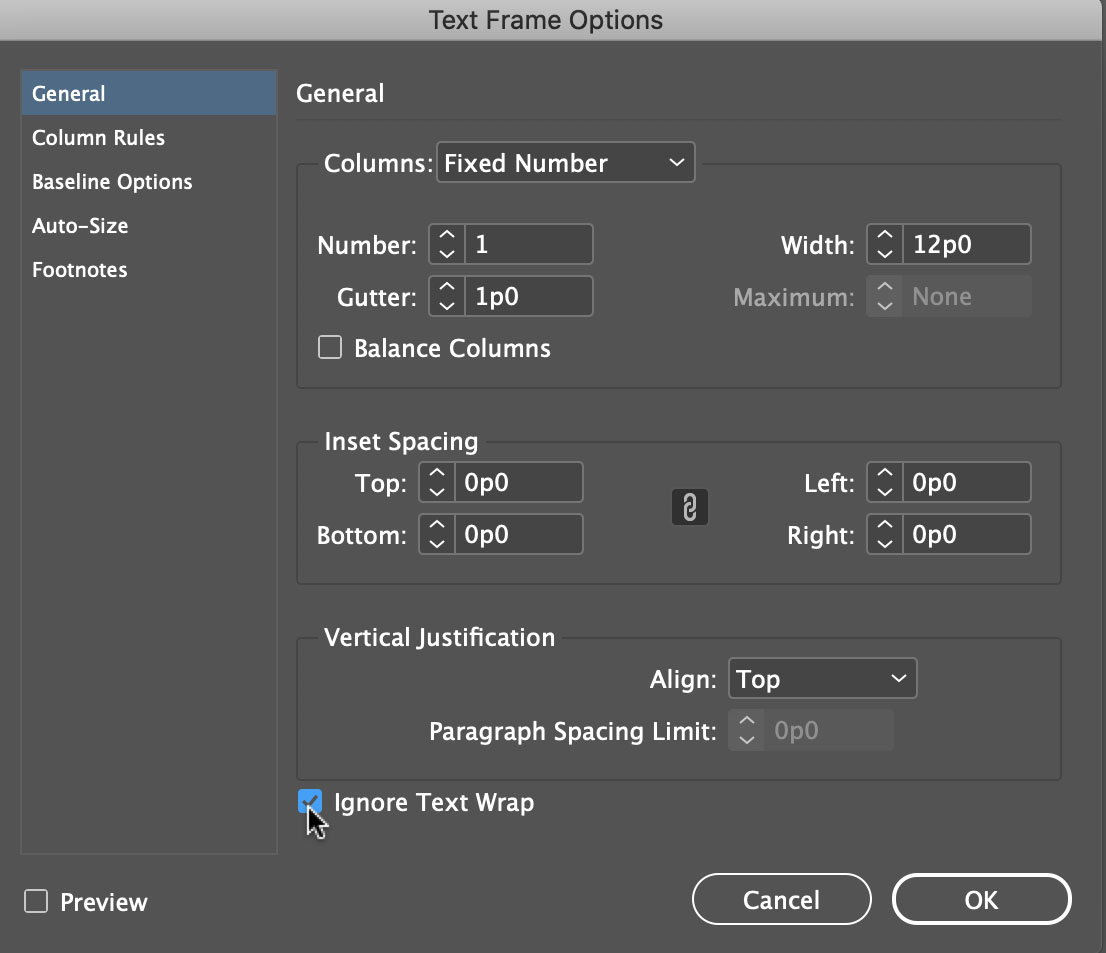
Knowing when text wrap is affecting your object can mean the difference between a happy day and a day spent banging your head against a wall.
All that said, there could also be one other explanation: The text might have Align to Baseline Grid turned on. If that’s the case, then pulling the text frame onto the pasteboard would allow it to appear, as noted in this other great article.
This article was last modified on November 24, 2021
This article was first published on May 27, 2010
Commenting is easier and faster when you're logged in!

Recommended for you

Mapping Paragraph Styles to PDF Tags in InDesign
Map Paragraph Styles in your InDesign document to the proper tags for accessible...
Better first proofs. Fewer review rounds. Introducing PreProof™
Most designers are already familiar with Preflight — checking a document for tec...

A Script for Styling Punctuation in InDesign
This free script formats punctuation to match the text immediately before and af...