



I haven’t had a desktop computer in years—just laptops! And I’m a Mac guy (proud, since 1984). But there’s a problem with Mac laptop keyboards that drives a lot of people crazy, and I want to explain how it works. Specifically, the Mac laptop keyboard seems to be missing a bunch of keys that I, as an InDesign user, need to use all the time, such as: Page Up, Page Down, Home, End, and Enter.
But actually those keys do exist on the MacBooks… they’re just hidden.
The trick is to hold down the Fn (“function”) key in the lower-left corner of the keyboard, along with one or more other keys:
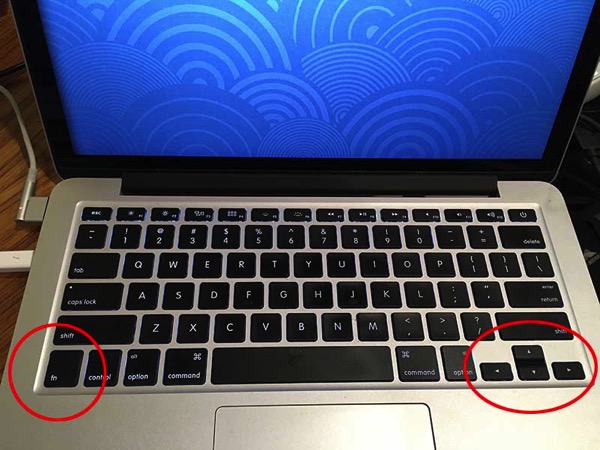
So, for example, to press Page Up, you hold down the Fn key and press the Up Arrow key. In InDesign, I almost never just press Page Up; instead, I want Shift-Page Up (which is “go to previous page”). To do that, I press the Shift key, then the Fn key, then the Up Arrow key.
Of course, the Fn key is usually used in conjunction with the “function” keys along the top of the keyboard. For example, if you press F7, you’ll just make iTunes go to the beginning of the song… but if you press Fn-F7, you’ll open or close the Layers panel!
[Note: If you feel so moved, you may feel free to insert an off-color joke about pressing the effin’ key whenever you use it.]
Here’s a list of Fn key combinations to get you the features you need everyday:
- Home (also Go to First Spread): Fn-Left
- End: Fn-Right
- Page Up: Fn-Up
- Previous Page: Shift-Fn-Up
- Page Down: Fn-Down
- Next Page: Shift-Fn-Down
- Previous Spread: Fn-Option-Up
- Next Spread: Fn-Option-Down
- First Page of Document: Shift-Command-Fn-Up
- Last Page of Document: Shift-Command-Fn-Down
- Go Back (last page you were on): Fn-Command-Up
- Go Forward: Fn-Command-Down
- Column Break: Fn-Return
- Frame Break: Shift-Fn-Return
- Page Break: Command-Fn-Return
- Go to the previous frame of the threaded story you’re in: Fn-Option-Command-Up
- Go to the first frame of the threaded story you’re currently in: Fn-Option-Shift-Cmd-Up
- Go to beginning of story: Fn-Command-Left
- Select from current position to end of story: Fn-Shift-Command-Right
- Go to first cell in a table row: Fn-Option-Left
- …and so on!
Don’t let appearances get in your way: You can use these “missing” keys on the Macbook and regain your productivity!
This article was last modified on July 25, 2019
This article was first published on February 23, 2017
Commenting is easier and faster when you're logged in!

Recommended for you

How to Keep AI-Generated Presentations Fully Editable
An AI-assisted workflow that actually works, so your files are beautiful and fun...

Omtool Releases Swiftwriter Plug-In for Adobe Acrobat and Adobe Reader
Omtool, Ltd. (OTCBB:OMTL), a leading provider of document capture and routing pr...

How to Find Hanukkah in InDesign (no matter how it’s spelled)
No matter how you spell it, you can find this holiday in your InDesign documents...