



So I just opened this file someone sent me, and it said there were a bunch of missing graphics. That’s not surprising, but when I went to look in the Links panel, I saw something really unusual:

What are those blue angle brackets doing in there, where the page numbers usually are listed? Clicking on them didn’t do anything (clicking on the blue, underlined numbers usually takes you to the image). Clicking the Go to Image button at the bottom of the panel didn’t do anything. I couldn’t find the images anywhere in the document… until it occurred to me that there can be content inside an InDesign document that isn’t on any page! Content can be imported into the XML Structure pane.
In fact, when I click the twirly triangle in the lower-left corner of the Links panel (or double-click the image in the Links panel) to open the Link Information section of the panel, it tells me exactly where that link is:

Yup: The angle brackets mean that the link is in XML only. Wacky. I opened the XML Structure Pane (View > Structure) and deleted the XML — which wasn’t actually tagged to anything in the document anyway, as it turns out:
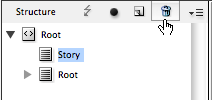
Then all those items disappeared from the Links panel. Whew!
This article was last modified on December 21, 2021
This article was first published on March 9, 2012
Commenting is easier and faster when you're logged in!

Recommended for you

Tip of the Week: Choosing the Right Folder for Relinking
This tip was sent to Tip of the Week email subscribers on May 7, 2015. Sign up n...

Document Overhead in InDesign’s PDF Can be Huuuuuuge
In which an exploration of why a PDF file is too large leads to two discoveries...
To Embed or Not to Embed Graphics in InDesign Files
You don't have to link to external graphics files; you can embed them! But do yo...