




InDesign has a lot of preferences that control the way it looks and behaves. In all, there are 20 sets of preferences in a dialog box with hundreds of individual settings. And it’s very important for any InDesign user to understand which of those preferences apply to the application as a whole, and which ones only affect the current document. But the dialog box itself gives you no clue. That why since CS 5.5, I have been producing a visual guide to InDesign preferences, with document-specific preferences highlighted.
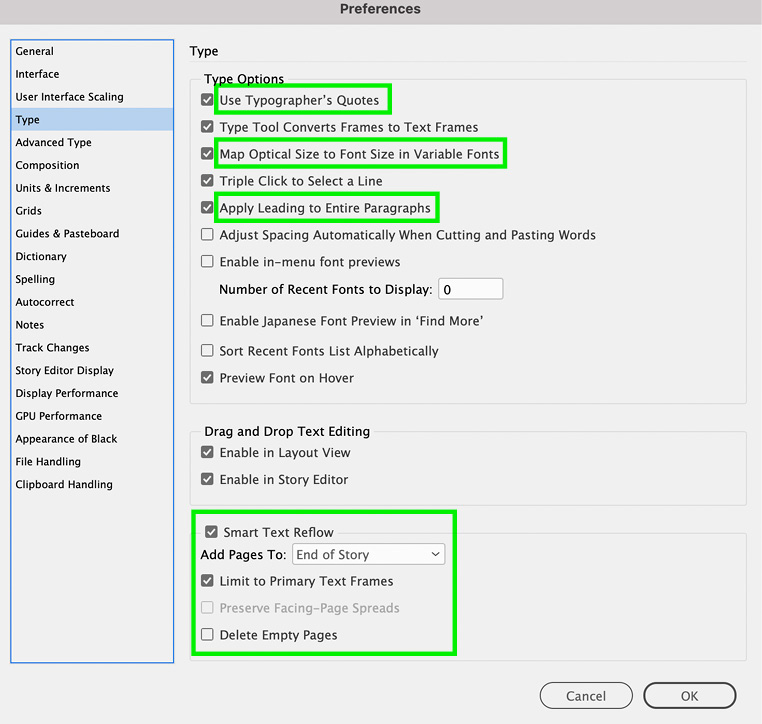
The guide has been updated and is an exclusive benefit for CreativePro members. To download the Visual Guide to InDesign Preferences, log in to your account and visit this page: InDesign Downloadable: Preferences Guide.
Vote for the Feature Request
I’ve also filed a feature request for marking document-specific preferences at the InDesign UserVoice page. Please vote for this feature request if you’d like to see preferences clearly marked in a future version of InDesign.
This article was last modified on March 11, 2026
This article was first published on November 23, 2018
Commenting is easier and faster when you're logged in!

Recommended for you


The Friendly Alien Easter Egg in InDesign
Back in the day, just about every major desktop publishing and design program ha...
Tip of the Week: Get More Screen Space
With this tip to Get More Screen Space in InDesign, you can quickly collapse doc...