



It seems like each day there is a new script coming out to do something cool in InDesign. But what about all the old scripts — those that were written for CS or CS2? Can you use them in InDesign CS3? If you’re a CS3 user with old scripts, you may find that they fail, offering nothing but a cryptic error message. But there’s hope: InDesign has a special “cs2 emulation mode” that allows you to use many older scripts.
The trick is to make a new folder inside this folder:
Mac: Applications/Adobe InDesign/Scripts/Scripts Panel/
or
Users/[username]/Library/Preferences/Adobe InDesign/Version 5.0/Scripts/
Windows: Program Files/Adobe/Adobe InDesign/Scripts/Scripts Panel/
or in XP:
Documents and Settings\[username]\Application Data\Adobe\InDesign\Version 5.0\Scripts\
or in Vista:
Users\[username]\AppData\Roaming\Adobe\InDesign\Version 5.0\Scripts\
The new folder should be called Version 4.0 Scripts
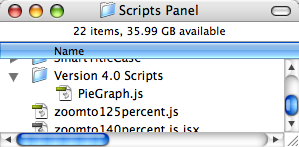
You can then put your older scripts inside that folder. They’ll show up in the Scripts panel (inside a similarly-named Version 4.0 Scripts folder), and you can run them by double-clicking on the script name (as usual).
My understanding is that this won’t work for all older scripts, but it does work for many of them, saving you the hassle of rustling up (or writing) a new version.
Bonus Script Troubleshooting Tip
By the way, I’ve gotten a couple of emails from people who simply can’t get their scripts to run on their Mac. They even did clean installations and the scripts still don’t work. I was flummoxed, but Ryan Russell–dedicated InDesignSecrets fan–came up with a solution that worked for him. He noticed (with the help of Adobe’s tech support) that some of his folder names on his hard drive were slightly wrong.
Specifically, the folders in this path:
User>Library>Preferences>Adobe InDesign>Version 5.0
weren’t named the same as in this path:
User>Library>Cache>Adobe InDesign>Version 5.0
Apparently, that’s all it takes for InDesign to break. He renamed the folders and all his scripts suddenly started working again. I don’t know if that will help anyone else, but it’s worth looking into.
This article was last modified on December 18, 2021
This article was first published on December 31, 2007
Commenting is easier and faster when you're logged in!

Recommended for you

Print Booklet in InDesign CS3
Many of you are familiar with the InBooklet SE plug-in which was included with I...
Spot Colors and Transparency Flattening in InDesign CS3
I was preparing a demo on transparency flattening and to my great surprise there...
InDesign CS3 Inside InDesign CS3!
One of the most useful features in InDesign CS3 is also one of the most unexpect...