


Forum Replies Created
-
AuthorPosts
-
 David BlatnerKeymaster
Search for
(.+?)*~_*(.+?)$
Replace with$2 ~_ $1The * part means “zero or more white spaces”, so this will find any kind of space before or after the em dash. But it will replace it with just a normal space (you can adjust that of course).
David BlatnerKeymasterNo, you will probably need to zip-compress the folder. For example on the Mac, you would right-click (or ctrl-click with a one button mouse) and choose Compress from the pop-up context menu. That will turn the whole folder into a .zip file that you can upload. In Windows, you do something similar, like right-click and choose “Make zip archive” (I can’t remember the wording exactly).
Tell your instructor that I say you should get extra credit because you were smart enough to come to InDesignSecrets to ask. :-)
David BlatnerKeymasterYou can search for
(\d+\.\d+)+\$
and replace with\$$1David BlatnerKeymasterI’m not going to recommend or advise on this, but I think LightningSource can handle it:
https://www1.lightningsource.com/ops/files/pod/TrimSizeMatrix.pdfYou can also try Lulu.com or perhaps amazon’s Createspace
https://www.createspace.com/Special/Pop/book_trimsizes-pagecount.htmlAugust 31, 2014 at 5:37 am in reply to: Indesign CC to Epub 3 with many hyperlinks-not validating #70340David BlatnerKeymasterAnother thought on glossary items: create them as footnotes. If I’m not mistaken, InDesign turns footnotes into “pop-ups” so that people can read them without having to actually jump to a different page (when the ereader supports that).
But if you want to do it as hyperlinks, that should be doable (either with hyperlinks or cross-references in InDesign). What error are you getting?
David BlatnerKeymasterI wonder if this old post would help:
https://creativepro.com/swapping-color-swatches-with-swatch-switcher.phpDavid BlatnerKeymasterI am nowhere near Karachi, but I’m sure it’s lovely there!
However, I do know that setting the leading to zero will make two lines appear “on top of” each other. For example:
https://creativepro.com/the-zero-leading-solution.phpDavid BlatnerKeymasterThere’s no way to do it truly randomly with GREP. You could create a findchangebylist.jsx file that would replace all “e” with “r” and all “T” with “A” and so on, but it would do the same thing for all letters. It would appear random, but wouldn’t be.
That might be enough to satisfy your client, but a codebreaker would be able to decipher it pretty easily.
David BlatnerKeymasterMaritza: I think your iPad thinks those are phone numbers! I don’t know how you can stop it from doing that. Strange.
David BlatnerKeymasterSorry, I’m not clear on what you’re trying to find. But I think the answer is: Put what you’re looking for in parenthesis, and then use $1 to call it back up.
For example, look at the “Fun Tricks” section here: https://creativepro.com/favorite-grep-expressions-you-can-use.php
David BlatnerKeymasterMake a character style that applies the color “None” and the size .1 pt. Then apply that style to quote marks using a grep style inside the paragraph style you’re using for the TOC.
David BlatnerKeymasterYou can put a “bullet” at the end of the line, but you can’t do it at beginning and end.
You could sort of fake it with something like this, perhaps:
https://creativepro.com/insert-a-special-character-with-grep-styles.phpOr you could set up the table of contents style to “disappear” the quote marks. So they would be there, but you wouldn’t be able to see them.
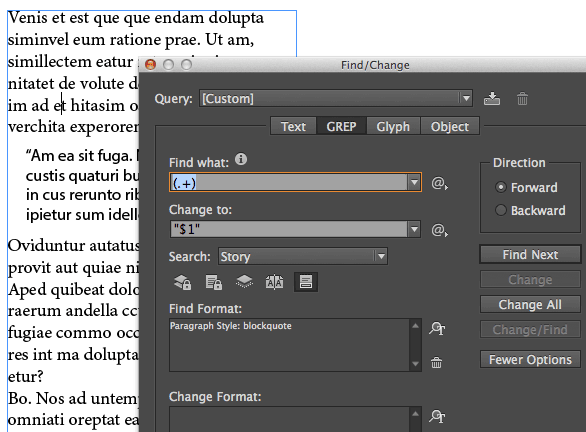
David BlatnerKeymasterIf you want to actually insert real quote marks, you could use find/change, with grep.
Search for
(.+)
in the paragraph style, and replace with
“$1”Such as:
-
AuthorPosts