


Forum Replies Created
-
AuthorPosts
-
 David BlatnerKeymaster
Oh, well that’s a bigger problem. Maybe export the document as IDML and open it again (that gets rid of most document corruption). Or check to see if you need to Accept All in the Track Changes panel? Not sure why it wouldn’t show up there.
David BlatnerKeymasterSee here:
 David BlatnerKeymaster
Jim, I think you already asked this (and I already answered) in a different forum here: https://creativepro.com/topic/indesign-index-for-mac
David BlatnerKeymasterOne way to do it is the Chartwell font: https://creativepro.com/creating-instant-charts-with-chartwell.php
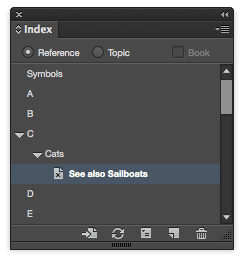
We are running a review of Chartwell in our October issue of InDesign Magazine.David BlatnerKeymasterYou need to remove the index entries from the Index panel. That is, find them in the alphabetical list of topics, then twirl open the triangles, select them and click the Delete button at the bottom of the Index panel.
David BlatnerKeymasterI assume that if you change the UI language to Greek, then the numbering would also change:
https://creativepro.com/change-ui-language-indesign-cs6-cc.phpBut otherwise, no, there is no way to change the numbering.
David BlatnerKeymasterWhile this post is slightly different, the underlying ideas should help:
https://creativepro.com/multi-level-automatic-numbering-in-indesign.php/David BlatnerKeymasterWhat version of InDesign?
David BlatnerKeymasterAlso note that I discussed this same process in my video title on Data Merge at lynda.com
David BlatnerKeymasterYou can post photos on one of many image sharing sites out there, including IMGUR or dropbox, etc,. and then just post the link here.
I can see how you could do this with a Live Caption, but you’d only see a percentage… not a checkbox. I’m curious how you get a checkbox!
David BlatnerKeymasterHow do you get the checkbox over the image to check itself when the artwork is 100%? That sounds like some third-party software you have installed.
David BlatnerKeymasterI think it may be possible, but you would have to do the calculation forms and scripting in Acrobat. Consider looking at pdfscripting.com or other Acrobat web sites for more information.
David BlatnerKeymasterI don’t think you can have it all, but this will get you close… one of my favorite data merge techniques, explained by Colin Flashman: https://creativepro.com/data-merging-individual-records-separate-pdfs.php
(Colin also wrote a great feature/cover article about data merge in InDesign Magazine a while back.)September 1, 2015 at 3:04 pm in reply to: GREP incorrectly shifting italics over in found text #77788David BlatnerKeymasterYes, when you move text around with grep, it moves it independently of the formatting. It’s like it goes under the hood, changes the text, and then puts the formatting back on again in the same place it was originally. In general GREP find/change is best done on unformatted text.
-
AuthorPosts