


Forum Replies Created
-
AuthorPosts
-
 David BlatnerKeymaster
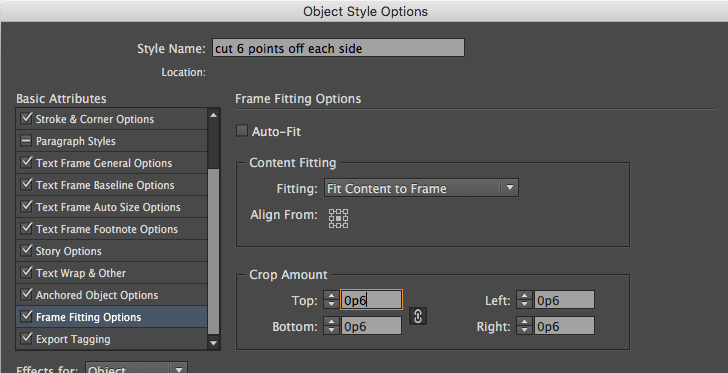
I think you could probably apply an object style to the frame, and use the Frame Fitting Options to force it to crop the edges by 1 or 2 points. For example, set up an object style like this (see below) and then when you apply it, it will resize the graphics in the frame:
 November 22, 2016 at 12:17 pm in reply to: How to adjust size of default document window to suit computer screen #90021David BlatnerKeymaster
On the Mac, if you have the Application Frame on (from the View menu), then set the size of the frame, it should remember that as the default size.
David BlatnerKeymasterJohn, I truly appreciate that gift! Thank you for letting us know. And much good luck to you for your project! Post or send us some pictures from the design.
David BlatnerKeymasterI think it is possible that one browser is using the OS PDF viewer and in another browser is using Acrobat’s plug-in. I am sorry to say you can NEVER trust how a web browser will display a PDF. It is a web browser, not a PDF viewer.
David BlatnerKeymasterYou could do this by hiding and showing “buttons” (the full article would be an object turned into a): https://creativepro.com/showing-and-hiding-objects-in-interactive-pdf.php
But note that button objects often don’t work when PDFs are viewed on iOS/mobile devices
David BlatnerKeymasterThanks, Aaron! Good to hear from you. Those expressions are great. But that won’t work if the question is the first sentence in the paragraph, right? Or if the previous sentence ends with an exclamation point or some other non-period punctuation.
David BlatnerKeymasterPeter is always an awesome help!
Another thing to think about, regarding books in a book file is that you can make a change on one of the master pages, set that as a the “master” document in the book, and then sync that master page.
https://creativepro.com/synchronize-multiple-indesign-documents.phpDavid BlatnerKeymasterThere is probably a more elegant way to do this but this is a start:
(\w||'|,|;|~_|~=)+?\?
That means look for a string of characters that could be “a letter or number, a space, an apostrophe, a comma, a semicolon, an em dash, or an en dash” and that ends with a question mark. (The vertical bar means “or”)David BlatnerKeymasterNo… but you can do it easily if you have used Layers.
There IS an “include master pages” button in the scope section of Find/Change. So turn that on to find stuff on the master pages.
So put all these master page footers/headers on a layer (where they should be anyway). Then when you do the find/change, Hide all the layers except for that header/footer layer. By default, InDesign won’t find text on a hidden layer.
David BlatnerKeymasterDavid BlatnerKeymasterI think you are correct, Dima: When you change the page size, it starts to break the Shuffle feature.
In most cases, I do not recommend changing the page size for Facing Pages documents.
https://creativepro.com/resizing-document-pages.phpNovember 16, 2016 at 7:24 am in reply to: How to adjust SIZE of video controller (Publish Online) #89800David BlatnerKeymasterNo, I don’t think there is any way to change the look of the video controller in Publish Online at this time. The Media panel controls are for Flash output and I don’t think they affect Publish Online, do they?
David BlatnerKeymasterHere’s another option with InDesign: https://creativepro.com/document-differencing.php
and
https://www.premediasystems.com/pdf-comparator.html -
AuthorPosts