


Forum Replies Created
-
AuthorPosts
-
March 9, 2018 at 12:15 pm in reply to: Centred paragraph style for a heading with rules/lines #102280
 David BlatnerKeymaster
As you point out, the normal way to do this would be using BOTH a rule above and a rule below, such as:
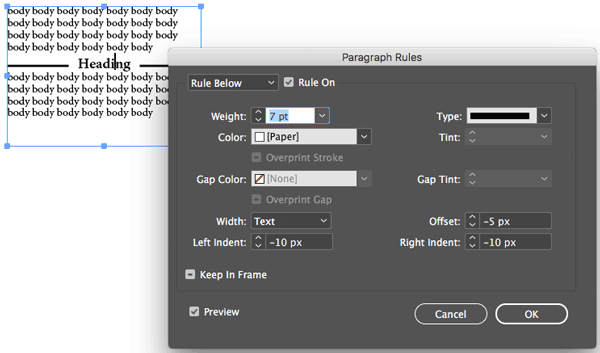
But you’re right that you cannot do this over colored backgrounds!
Hm. I can’t think of any good way around that. Anyone else?
David BlatnerKeymasterWell, it’s important to remember that the text wrap of anchored objects never affect the line they’re anchored in.
https://creativepro.com/wrapping-text-around-an-anchored-object.phpDavid BlatnerKeymasterIf the lines still appear when you turn on Preview, then they almost certainly WILL print!
My guess is that you have the Underline feature turned on. Perhaps there is a character style applied? (Look in the Character Style panel. Or, select the text and see if the Underscore button is turned on in the Control panel.)David BlatnerKeymasterDo the lines disappear when you go into Preview mode? (Press W to go into or out of Preview mode.) Are the lines straight or wavy? Are they the same color as the text frame edge or a different color?
David BlatnerKeymasterSorry, I’ve never heard of JATS XML. This forum is really focused on how to use InDesign to create EPUB.
David BlatnerKeymasterI hear your pain, but how should InDesign know whether something should be a straight quote or curly (typographer’s) quote? I think that usually takes a human eye.
However, there are some tricks in the link below that might help. For example pressing Ctrl-quote makes it straight (at least on the mac)
https://creativepro.com/curly-typography-quotes-turn-off.phpDavid BlatnerKeymasterI haven’t heard of any changes, but that does sound really weird. These are QR codes made with data merge? If you make them manually (from nothing) do they work okay?
David BlatnerKeymasterNiels: Ah! Of course… I think that may only be available on Windows… I forgot about Acrobat’s PDF printer feature, because it has been disabled on the Mac for so many years.
David BlatnerKeymasterThat IS strange. Have you tried exporting the file as IDML and then opening that IDML file? That might clear up some corruption or something.
Also, make sure the Dictionary pane of the Preferences dialog box is set the same as yours.
Here’s more ideas:
https://creativepro.com/why-red-squiggly-underlines-when-words-are-not-spelled-wrong.phpDavid BlatnerKeymasterNiels: How?
You can do this in the Separations Preview panel, but how do you output just one channel to PDF?
David BlatnerKeymasterAs Janet pointed out, you can do this with spans, as shown here:
https://creativepro.com/adding-space-above-below-lists-span-column.phpDavid BlatnerKeymaster -
AuthorPosts