



One of the biggest productivity features in the last couple versions of InDesign has been Live Preflight. We’ve covered the basics of it here and here. But the greatest problem in using it for print workflows has been knowing what preflight rules to include.
Ideally, you would get this information from your printer, but this isn’t always convenient or possible. David pointed out some time ago that there is an organization which provides free Live Preflight profiles for different segments of the graphics industry. This is VIGC (the Flemish Innovation Center for Graphic Communication). This Belgian organization is affiliated with the Ghent PDF Workgroup (GWG)?a worldwide organization of experts which has developed profiles for creating and preflighting PDFs.

VIGC Logo
In July 2010, they released version 2 of their extremely useful preflight profiles which now work with InDesign CS4 and CS5. What’s new? All the profiles have been updated based on user feedback, and include the seven new checks available in Adobe InDesign CS5. For example, you can now check for files that differ in size and orientation, unresolved caption variables, and several kinds of interactive elements, among other rules.

VIGC Profile Loaded
Previously they provided 13 profiles for different segments of the graphics industry. They have now been expanded to 18, adding five for packaging based on new GWG specifications. You can either use them as they are, or modify them for your own print workflows.
The already excellent tutorials that come with the download have been revised and expanded, and they are a great way to learn to use preflight profiles for Live Preflight.

VIGC Tutorial
To help you pick which profile to use, you can gather information from the README PDF and two Excel tables that show all the rules included in each of the 18 profiles. A How To Guide gives you the steps to try out the profiles.
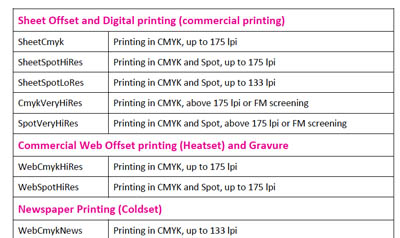
VIGC ReadMe
There’s nothing quite like this resource, and they’re free for you to use or modify!
This article was last modified on December 20, 2021
This article was first published on September 23, 2010
Commenting is easier and faster when you're logged in!

Recommended for you

A Down and Dirty Way to Lock Content
Prevent accident changes to finalized content by exporting to InCopy.
Transforming Pages in CS5
With CS5 you can transform pages with Scale, Shear, Rotate, and Free Transform.
Mirror, Mirror On The Page: Cute Reflection Trick
Want to create a fun reflective appearance in InDesign – without having to...