



I was digging around in the InDesign CC 2015 “Object Model” today while working on a complicated script project, and I ran across this: 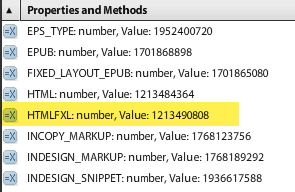
For those unfamiliar with scripting, this might not look like much. But it stopped me cold. This command didn’t exist in previous versions of InDesign. The documentation for the command simply says “Exports to XHTML FXL format.”
Wondering what “XHTML FXL format” is, I decided to try it with a simple script. Lo and behold, this command adds an undocumented export type to InDesign. When used in a script, it outputs the file as an HTML with proper supporting CSS and JavaScript to a “fixed layout” type of HTML format, that looks and behaves just like a fixed layout EPUB, with the big exception that each page is output as a single HTML file. Animation added via the Animation and Timing panels appears to be fully supported, as well as text and object hyperlinks.
Click here to download a script you can use to try this out for yourself.
The script asks you to choose a folder to save the HTML files into, and then names each file the same as the InDesign file with an html filename extension.
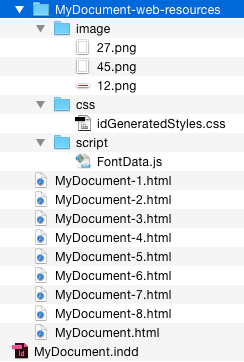
I thought I’d share this because I thought it was interesting, and it might be useful for someone in some way. I suspect this command is “under the hood” in InDesign due to the “technology preview” of the new Publish Online feature in the English versions of InDesign CC 2015.
While this is pretty amazing, it is no substitute for products like in5, since there is no way to automatically link the HTML pages together, no control over how the HTML is positioned and sized within the browser, and more.
Another caveat: at this point, it’s not clear how publishing documents this way fits (or doesn’t) with your font licenses. So it would be safest to limit your early explorations with this feature to documents using free or open source fonts.
This article was last modified on August 8, 2019
This article was first published on July 30, 2015
Commenting is easier and faster when you're logged in!

Recommended for you

InDesign How-to Video: Move Layers From InDesign to Photoshop
In this week’s InDesignSecrets video, David Blatner shows off a script to send a...
ChainGREP: A Script that Gives You GREP Super Powers
In my experience, there are there are two keys to achieving amazing feats of eff...
The CreativePro Accessibility SuperGuide
A compendium of essential knowledge, tools, and techniques for producing accessi...