



Performance Gains
While new features are appreciated, most of us expect an OS update to run faster and better. Jaguar does accomplish this feat to some degree, depending upon your hardware configuration.
As I briefly mentioned in my previous column, Jaguar introduces a new version of the Quartz imaging model, dubbed Quartz Extreme. It optimizes performance using the PowerPC G4’s Velocity Engine floating point routines and the OpenGL acceleration found in recent AGP graphics cards (see figure 1).
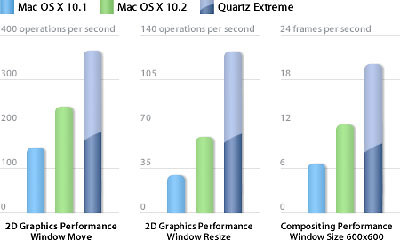 Figure 1: I found this chart from Apple’s Quartz Extreme page difficult to interpret. There’s no mention of which Mac model was used, which is important to the results. And did they somehow turn off Quartz Extreme to get the middle set of numbers? Or is that the result of using an older graphics card? It’s a mystery. Whatever — Quartz Extreme is faster than plain-vanilla Quartz.
Quartz Extreme lets the Mac off-load graphics routines and display from the main G4 processor to the graphics processor on the video card (often called the GPU). This graphics chip is designed specifically to do these tasks and until Jaguar came along, only Windows systems took advantage of this architecture. The Macs in question are AGP-based models running an ATI Radeon or NVIDIA GeForce2 MX, GeForce3, GeForce4 MX, or GeForce4 Ti graphics processor. Apple’s Quartz Extreme page states that the card needs a minimum of 16 MB of video RAM for this feature; more is better here, no doubt.
While its primary speed will be found in these machines, especially a dual-processor model, Jaguar did offer an extra bit of pep to my PowerPC G3-based notebook and an even greater snap to my single-processor G4 machine, without the heavyweight graphics card. The speed gain is evident when starting up the computer, and when scrolling down windows.
I strolled over to a local Mac shop and played around with a dual-processor machine running Jaguar. Much, much faster.
Compatibility
For content creators working in a multi-platform environment, Jaguar offers many convenient features, including support for virtual private networking (VPN) and improved peer-to-peer file sharing using the SMB (Server Message Block) protocol standard found in Windows computers.
OS X 10.1 let users access shared folders on a network only by typing in a URL address — hardly the most elegant approach, causing the owner of the Windows machine sharing the folder to dig out the often dynamically derived number. Jaguar supports SMB browsing, so that a shared folder on a Windows machine appears in the Mac’s Connect to Server window (found under the Go menu) along with any Mac servers on the network. The shared Windows folder can be mounted like any other server. This browsing feature currently works for items on the local subnet, although not for servers across a large enterprise or with virtual private networks.
Meanwhile, Jaguar also can present its shared folders to Windows users in their My Network browser. They can deal with your Mac folder just like a PC folder.
This all worked as advertised for my small network at home. From my Jaguar machine, I was able to see the shared folder on my Windows 98 machine and vice versa. Jaguar’s Connect to Server dialog still presents the Mac’s URL number just in case it’s needed for far-flung servers (see figure 2). However, the number wasn’t necessary for me as everything just connected seamlessly since it was in the same part of the network.
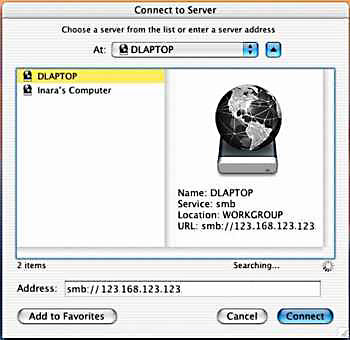 Figure 2: Here you can see Jaguar’s Connect to Server dialog showing a Mac and a Windows machine, in the WORKGROUP location, really my home office. In a fit of virtual pique, my Power Mac G4 decided to stop working at this time and remained down until I started updating some system files on the PC. Then, the G4 suddenly revived itself after a 12-hour vacation.
Jaguar also comes with a VPN client and adds support for the Windows’ Active Directory authentication.
“These are the biggest set of improvements that Apple has ever made to Windows compatibility,” observed John Rizzo, founder and editor of MacWindows, a site for cross-platform integration solutions. Until the release of Jaguar, some of these features were available only through third-party software (or not at all).
According to Rizzo, Jaguar contains a number of compatibility technologies still awaiting full implementation. For example, Jaguar adds support for the robust IPsec authentication scheme, while the current VPN client is based on popular, less-secure Microsoft Point-to-Point Tunneling protocol (PPTP). “Still, it’s great to see Apple listening and addressing enterprise concerns,” Rizzo said.
This article was last modified on January 18, 2023
This article was first published on September 5, 2002
Commenting is easier and faster when you're logged in!

Recommended for you
NAPL, NAQP and a Coalition Comment Following Adobe Forum: Says Kinko's & Adobe Deal Must be Dissolved
In a July 20, 2007, letter to Adobe Systems, Inc. CEO Bruce Chizen, Joseph P. Tr...

Another Way to Delete All the Images (but leave the frames)
A while back I wrote up a short blog post about a script that would let you dele...

How to Make an LCD Digital Calculator Effect
You never know where you’ll find inspiration to create something. Yesterday’s Go...