



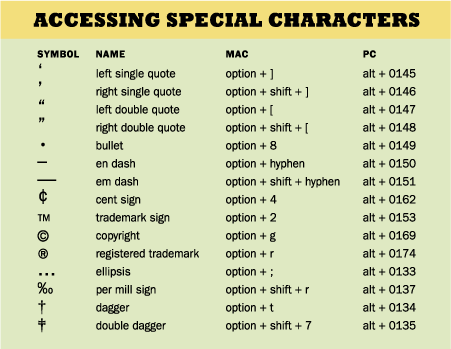
Q. I often use hard-to-find characters, such as register and trademark symbols, and en and em dashes. Mousing through submenu after submenu to find them in a software program’s special characters listing gets tedious. And a glyph palette, although handy, is still the long way around when a key combination would be fastest. It would be nice to have a list of all of the special characters.
A. Yes, some of these paths to find the somewhat hidden signs, symbols, and smart punctuation are tedious indeed. I also agree that using the keyboard to access them is the fastest way to go. Although I’ve memorized most of them, they’re all on a Stickie note on my desktop for easy reference.
Here is a list of the most commonly used special characters:
Are there other special characters you use frequently? Post your comments here!
This article was last modified on October 23, 2023
This article was first published on April 9, 2008
Commenting is easier and faster when you're logged in!

Recommended for you

Type Nerd Alert: Adobe's Changing Faces
According to Typblography, a blog written by the Adobe type development team, Ad...

The End of the Line
As job descriptions and responsibilities have been telescoped over the past coup...

Scanning Around With Gene: Dymo-Mite! The Art of Labeling
I’m on a new (and what I hope will be final) kick in a lifetime of efforts...