



[Editor’s Note: This is from 2006. InDesign has its own Track Changes feature now.]
Craig writes:
How does one track type changes within InDesign?
Quark had a XTension called black lining at one stage, is there any thing like that for InDesign?
Though I never used it myself, the same company that sells the Blacklining XT for QuarkXPress, EMS (“software development for publishers”) now has a version for Adobe InDesign CS2, Mac or Windows platforms. You can download a demo of the plug-in here.
From their site, though, I can’t tell how much it costs … per license, it’s either $395 (“Blacklining 3”) or $1195 (“Blacklining 6”). That’s a huge price difference, but I can’t find any info on the difference between the two products. Is 6 an upgrade from 3? Is one just for InDesign and the other for QuarkXPress? Neither the Purchase Product screens nor the FAQ give any clues. The Download Demo link above calls it “Blacklining for InDesign.” It’s aggravating. Well, at least there’s a demo. And an opportunity for an enterprising web designer…
I’d be remiss if I didn’t mention another possible solution, Adobe InCopy ($249, Mac/Windows). It’s not a plug-in, it’s a standalone program, but you can run both on the same computer if you’re the sole user.
InCopy’s Track Changes feature provides an audit trail of any text changes made to a story in an InDesign document, whether you change the text in InCopy or in InDesign. It tracks what was changed, who changed it and when. You can turn it on or off on a per-story basis.
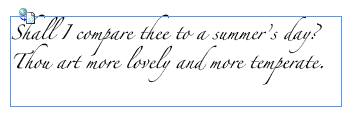
In InDesign, or in InCopy’s Layout View, even if Track Changes was turned on and the story was heavily edited, text appears as though all edits made to the story thus far have been accepted, as shown below. (The little icon on the frame indicates the story can be edited in InCopy.)
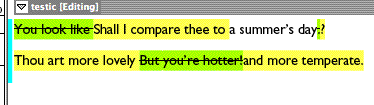
To see the edits made to the story, switch to one of the other views in InCopy; Story or Galley. These views are mainly for copy-editing and show only minimal formatting. For Track Changes, I’ve set my InCopy Preferences to strikethrough my deletions and put a green background behind them. I specified a yellow background for my additions.
There’s lots more to Track Changes, but I think you get the general drift. You may find it to be the solution you’re looking for.
This article was last modified on December 18, 2021
This article was first published on August 17, 2006

Recommended for you

Fixing Unwanted Default Formatting
Does InDesign seem to have a mind of its own, applying weird formatting or style...
How to Strip a Document of Styles
When a client asks for the original files, you may feel tempted to strip out all...
Use New Window to Hide Your Selections
Lee wrote: Sometimes I like to use 'undo' to compare the difference between two...
Comments are closed.